How long does a DDoS attack last? Two real cases from operations
Most DDoS attacks are over in minutes, some run for hours. This article shows both using real measurements: an attack at 745.5 Gbps and 73.1 million packets per second that ended after eight minutes, and one at 501.2 Gbps that ran for three hours and 31 minutes. Plus how to read an attack alert field by field, why packet rate often matters more than bandwidth, and why changing port or address would have helped in neither case.
The question almost always comes in the first few minutes of an attack, and it almost always comes in this form: how much longer is this going to last? The honest answer is that the duration does not depend on the target, it depends on whoever paid. The vast majority of attacks are over within minutes. A smaller, but by no means rare, share runs for hours. For the defense, those are two completely different jobs.
This article shows both cases using real measurements from KernelHost operations: an attack that was over after eight minutes and peaked at 745.5 Gbps, and one that ran for three hours and 31 minutes and peaked at 501.2 Gbps. Both were filtered completely, both without downtime, both without null routing. The figures come straight from the live monitoring of the mitigation, with only the last octet of the target address removed.
The short answer
A typical DDoS attack lasts minutes, not hours. The reason is that the overwhelming majority of attacks run through rented services sold in time slots, and at almost every provider the cheapest slot is the shortest one. Whoever orders an attack against a game server usually buys 60, 300 or 600 seconds.
That explains the shape of the distribution: a very high peak at a few minutes and a long, thin tail reaching into hours and, in individual cases, beyond a full day. The tail is the expensive part. It appears when someone holds a subscription, when several buyers attach themselves to the same target, or when the attack restarts automatically as soon as it ends.
For you as the target, that means two things. First, waiting it out is statistically often right, but it is not a strategy, because you cannot know in advance which part of the distribution you landed in. Second, a defense that absorbs short spikes but gives way under sustained fire solves only half the problem.
Two real attacks from our network
The two alerts below are ten days apart and hit different customers. They are interesting because their properties are almost opposites: one is extremely short and extremely hard, the other is considerably weaker and sustained instead. Both fall into the category the monitoring flags as Fast Flood, meaning an attack that does not cross the alert threshold slowly but within a very short time.
Case 1: eight minutes, 745.5 Gbps, 73.1 million packets per second
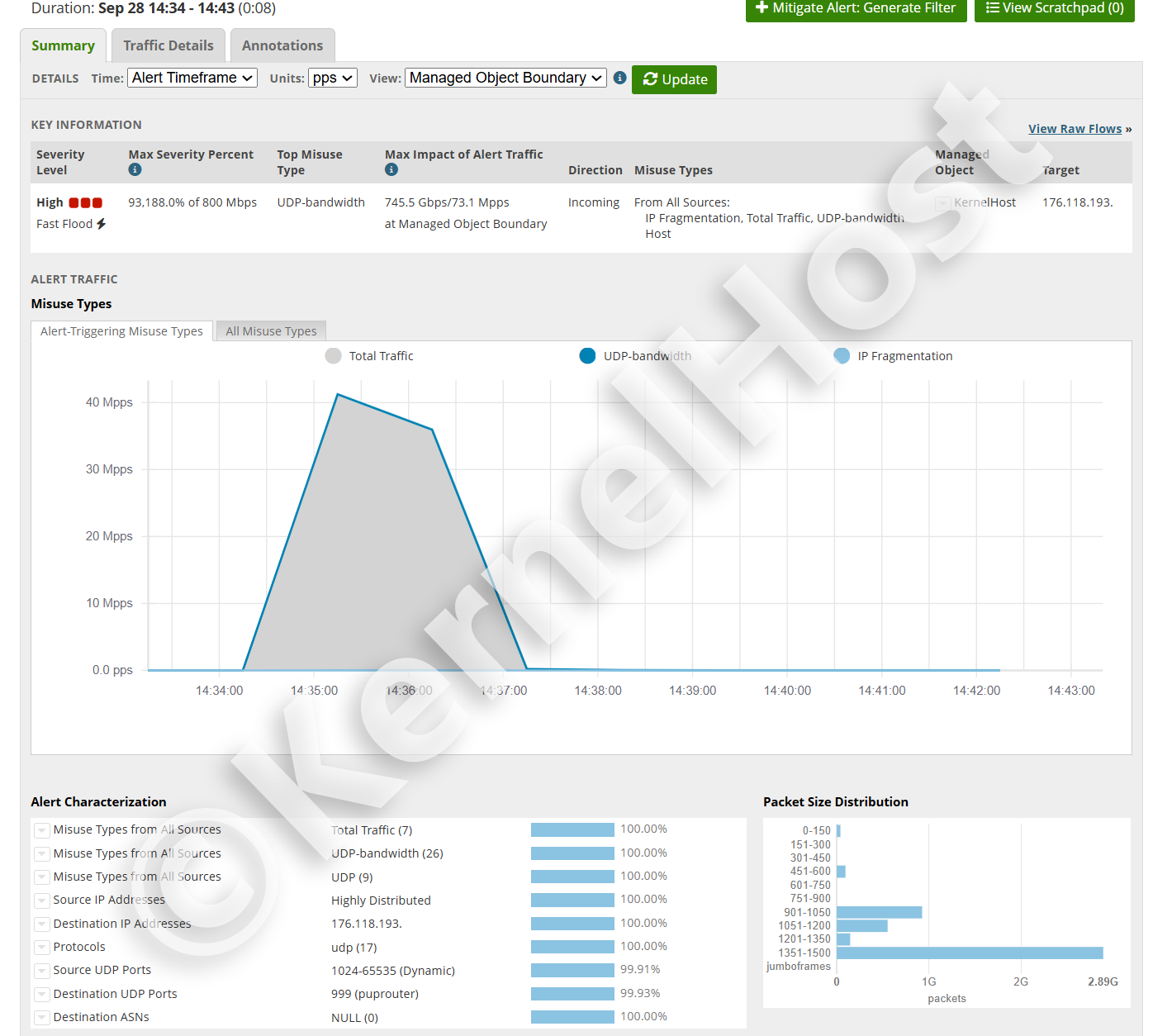
On 28 September 2026 at 14:34 a UDP flood started against a customer service. By 14:43 the alert was closed, a total duration of eight minutes. The actual barrage was shorter still: the curve rises between 14:34 and 14:35, holds for about two minutes and drops back to zero between 14:36 and 14:37.
In that short window the attack reached 745.5 Gbps and 73.1 million packets per second at the managed object boundary. For scale: a 1 Gbps link carries roughly 1.49 million packets per second at minimum Ethernet frame size. The attack therefore ran at about 49 times the packet rate and 745 times the bandwidth of such a link.
The service stayed reachable throughout. There was no failover, no move to a different address and no null route. Filtering was in place from the first second, because it is permanently active on every server package and is not switched on only once an alert fires.
What this alert says, field by field
The alert is not just a picture, it is a measurement. The fields can be checked against one another, and that is exactly what makes them credible.
Max Severity Percent: 93,188.0% of 800 Mbps. The alert threshold for this managed object is 800 Mbps. The attack reached 931.88 times that threshold. Do the arithmetic: 931.88 times 0.8 Gbps gives 745.5 Gbps. That is exactly the value in the field next to it. Both numbers come from the same measurement and confirm each other.
Top Misuse Type: UDP-bandwidth. The dominant pattern was sheer UDP bandwidth, not a protocol attack and not an application attack. Alongside it, the monitoring flagged IP Fragmentation and Total Traffic as further triggering patterns.
Source IP Addresses: Highly Distributed, 100%. There was no dominant source and no small group of sources. The traffic came from a very large number of addresses at once. That is why a block list achieves nothing in cases like this: there is nothing meaningful to put on a list.
Protocols: udp (17), 100%. UDP only. No TCP, no ICMP.
Source UDP Ports: 1024-65535 (Dynamic), 99.91%. Source ports were random. That effectively rules out reflection via a fixed service port as the main vector and points to traffic generated directly by a botnet.
Destination UDP Ports: 999, 99.93%. Almost all traffic went to a single destination port. This attack targeted one specific service, not the server in general.
Packet Size Distribution: concentrated at 1351 to 1500 bytes, around 2.89 billion packets. Those are large packets, close to the usual MTU of 1500 bytes. In that size class alone, between 3.9 and 4.3 terabytes arrived, in a matter of minutes.
This number can be cross-checked too: 745.5 Gbps divided by 73.1 million packets per second gives a mean packet size of roughly 1275 bytes. That fits a distribution concentrated at 1351 to 1500 bytes that also picks up some smaller classes below.
Case 2: three hours and 31 minutes, 501.2 Gbps, 43.9 million packets per second
On 18 September 2026 an attack started at 09:33 and did not end until 13:05. The alert duration was three hours and 31 minutes. The chart in the figure shows a two hour excerpt from it, 11:05 to 13:05, because the full duration in a single chart would blur the structure.
That excerpt makes the difference from the first case clear. There is no single spike that comes and goes. Over two hours the curve moves between roughly 8 and 24 million packets per second, with dozens of drops and renewed rises. This is not one shot, it is a sequence of waves following each other without a pause.
The peak reached 501.2 Gbps and 43.9 million packets per second, about 30 times the packet rate and 501 times the bandwidth of a 1 Gbps link. Here too the measurement confirms itself: 62,652.0% of 800 Mbps is 626.52 times the threshold, and 626.52 times 0.8 Gbps gives exactly 501.2 Gbps.
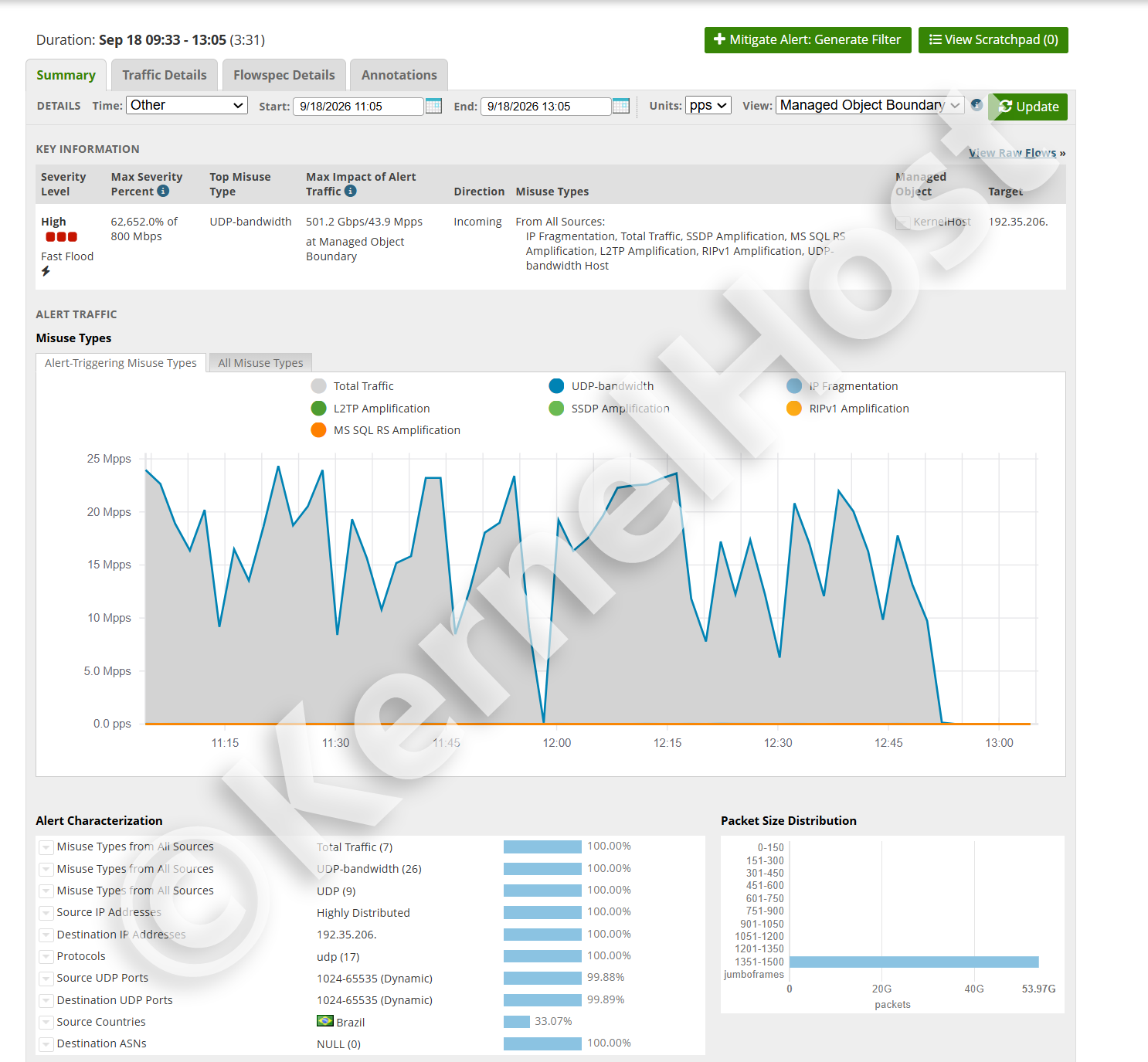
In the largest packet class alone, 1351 to 1500 bytes, the monitoring counted around 53.97 billion packets within that two hour window. Depending on the exact size, that is between 73 and 81 terabytes heading for a single server, none of which reached it.
What separates this attack from the first
Three fields set the two cases apart clearly, and each has practical consequences.
The destination port. In the first case 99.93% of traffic went to port 999, that is, to one service. In the second case 99.89% spread across the entire 1024 to 65535 range. The attacker was not aiming at an application but at the address. Moving the service to a different port gains nothing here, because the attack hits every high port simultaneously anyway.
The attack patterns. The first case triggered three patterns. The second triggered seven at once: IP Fragmentation, Total Traffic, SSDP Amplification, MS SQL RS Amplification, L2TP Amplification, RIPv1 Amplification and UDP-bandwidth Host. That is no longer a single tool, that is a combination of at least four amplification vectors plus directly generated traffic.
The origin. Source addresses were highly distributed here as well, but the country breakdown shows a concentration: 33.07% came from Brazil. Which also means two thirds came from elsewhere. A country level block would have stopped one third of the traffic and let two thirds through, while cutting off part of the genuine users as well.
Why duration is the real problem
A peak of 745 Gbps sounds more dramatic than 501 Gbps over three and a half hours. In practice the second case is the harder one, for reasons that have nothing to do with peak load.
The short attack hits the technology
A burst of a few minutes is purely a capacity question. Either the filtering sits in front of the link and has enough headroom, or it sits behind it and is useless. If the headroom is there, nothing happens that outlasts the attack. It ends, the counters fall back, and apart from the monitoring entry nothing remains.
A short, very hard attack can therefore be less harmful than a medium one that runs for a long time. All that matters is whether filtering takes effect above the bottleneck. Anything happening on the server itself arrives too late: by the time packets reach the network adapter, the link is already full.
The long attack hits the organization
Three and a half hours is a working period. Things unfold in that time that never even start within eight minutes: monitoring systems escalate, customers open tickets, a game server loses its community for the evening, a shop loses a daily peak, a service provider starts taking phone calls. Improvising in that situation produces mistakes.
This is exactly where the two most common reactions do the most damage. The first is changing the IP address: it works against an attacker who does not know the new address, and it fails against one watching the DNS record. The second is the null route. It ends the attack on the link, but it ends it by taking the server off the network. What exactly happens then is covered in null routing and blackholing explained.
What additionally breaks under hours of fire
A sustained attack exposes weaknesses a short burst never reaches. State tables fill up wherever the filtering has to track state. Log files grow until the partition is full, especially when every dropped connection writes a line. Metrics and flow collection generate load of their own that scales with the packet rate. And every automatic reaction that made sense on first trigger is still running three hours later, long after its purpose has gone.
The most important quality criterion for a defense is therefore not the peak figure on the data sheet but whether it still works in minute 211 the way it did in minute one. In the second case above, there was no difference in effect between minute one and minute 211.
Gbps or packets per second: which number counts
Both alerts carry two numbers side by side, and they mean entirely different things. Bandwidth in Gbps tells you whether the link is full. The packet rate in millions of packets per second tells you whether the devices on that link are still keeping up.
The arithmetic behind both cases
Divide bandwidth by packet rate and you get the mean packet size. In the first case that is roughly 1275 bytes, in the second roughly 1427 bytes. Both sit close to the 1500 byte MTU, and both match the distributions, each concentrated at 1351 to 1500 bytes.
That is not coincidence, it is a deliberate choice by the attacker. Large packets fill the link with as little effort as possible on the attacking side. Small packets barely fill a link but bring devices with limited packet processing to a standstill. Whoever wants to saturate the link sends large packets. Whoever wants to overload hardware sends small ones.
Why large packets mean something different from small ones
A numerical example makes the difference obvious. At 1500 bytes of payload per packet it takes about 81,000 packets per second to fill 1 Gbps. At minimum 64 byte frames it takes about 1.49 million, nearly 18 times as many. Both figures count the full frame on the wire, preamble and interframe gap included. Same bandwidth, an entirely different load on every device along the path.
That is why the 73.1 million packets per second from the first case is the genuinely remarkable figure. At that packet size it corresponds to a bandwidth no single server and no single link can carry. Filtering has to sit far ahead of it, otherwise it is meaningless. More on this in what is a DDoS attack.
The amplification vectors in the second case
The long attack used four different amplification vectors at once. The principle is the same in all of them: the attacker sends a small request with a forged source address to a service that is reachable on the internet and answers over UDP. The answer does not go to the attacker but to the victim, and it is many times larger than the request.
The appeal for the attacker lies in exactly that factor. They only need to produce a fraction of the bandwidth that arrives at the victim, and they stay hidden behind other people's addresses. Unless stated otherwise, the factors below come from the overview of UDP based amplification attacks published by the US Cybersecurity and Infrastructure Security Agency, CISA.
SSDP, UDP port 1900
The Simple Service Discovery Protocol belongs to UPnP and exists to find devices on a local network: printers, routers, smart TVs, network storage. A great many of those devices inadvertently answer requests from the internet as well, because UPnP is active out of the box and the firmware was never updated. CISA puts the SSDP amplification factor at 30.8.
SSDP is so widespread because the pool of usable devices is enormous. These are not servers, they are consumer devices in private homes, and their owners notice nothing of their involvement.
MS SQL Resolution Service, UDP port 1434
The Microsoft SQL Server Resolution Service answers the question of which port a named database instance is listening on. The request is a single byte, the answer contains instance names, versions and ports and is correspondingly longer. This service does not appear in the CISA overview. Shadowserver and the Irish NCSC put the amplification at up to 25 times, and individual published measurements run considerably higher.
That this service is reachable from the internet at all is, in nearly every case, a misconfiguration. A database server does not belong on the public network unprotected, and the resolution service least of all.
L2TP, UDP port 1701
The Layer 2 Tunneling Protocol is used for VPN dial-in, usually in combination with IPsec. Wherever the far end answers at the UDP level without authentication, the service can be abused for reflection. This vector is younger than the other three and appears mainly because older routers and access concentrators are deployed in large numbers.
Anyone running a VPN service should therefore check whether the dial-in port answers arbitrary addresses. Guidance for that is in protecting a VPN server from DDoS.
RIPv1, UDP port 520
The first version of the Routing Information Protocol dates from the 1980s and has no authentication. A router that speaks RIPv1 and is reachable from the internet answers a short request with its entire routing table. CISA gives an amplification factor of 131.24 for it, by far the highest of the four vectors used here.
RIPv1 should no longer be active on any network. That it finds its way into an attack in 2026 shows above all how long forgotten devices stay deployed.
IP fragmentation
This pattern is not an amplification vector but a consequence of the others. When an answer is larger than the path MTU, the sender splits it into fragments. The victim then receives partial packets that have to be reassembled before it is even clear what they contain.
That is unpleasant for two reasons. First, reassembly costs memory and time, and it does so before any filtering decision at application level would be possible. Second, subsequent fragments carry no port numbers, because the UDP header only appears in the first fragment. A filter rule deciding by destination port therefore does not apply to them at all. Both alerts above show IP Fragmentation as a triggering pattern.
How long attacks typically last
The two cases above are individual observations, not statistics. Still, it is worth looking at the structure, because it explains why duration varies so widely.
The distribution has a long tail
Minutes are the normal case. That is not coincidence but the result of pricing on the attacking side. Rented attack services sell time slots, and the smallest slot is the cheapest. Whoever wants to annoy a rival in a game does not buy an hour, they buy a round.
Long attacks come from different motives. Extortion needs duration, otherwise the threat is not credible. Attacks against shops or providers aim at an entire business day. And some long attacks are simply the sum of many short ones, because several buyers independently attach themselves to the same target, or because an automation restarts the attack as soon as the paid slot expires.
Why you cannot predict the duration
Nothing in the first minute tells you how long it will continue. The 745.5 Gbps attack looked more dramatic in its opening seconds than the one that ran for three and a half hours. Basing your reaction on how bad it feels means deciding on unreliable ground.
The only answer that works regardless of duration is filtering that runs anyway. Then the question of how long it lasts stops being an operational question and becomes a matter of curiosity.
Why changing port or address rarely helps
Both measures get suggested almost reflexively during an attack, and both fail on what the alerts above actually say.
Changing the port only helps if the attack targets one port. In the first case it hit exactly one port with 99.93%, so a change would have worked briefly, until the attacker found the new port. In the second case it spread across the full 1024 to 65535 range. There is no port to move to.
Changing the address only helps as long as the new address is unknown. The moment a DNS record points to it, it is public and the attack follows, often within minutes. During an attack lasting three and a half hours that is not a solution, it is a delay. How to keep your address out of public view in the first place is covered in protecting your IP address.
What to actually do, and in what order, during an acute incident is covered in what to do during a severe DDoS attack.
What happened at KernelHost during those three and a half hours
The short version: nothing that affected the customer. The service stayed reachable, there was no failover, no null route and no address change. The customer had nothing to request and nothing to configure.
The reason is that filtering at KernelHost is not switched on when an attack arrives, it is permanently active: 17 Tbps of mitigation capacity in the global scrubbing network, and in front of it Arbor real-time filtering with 3.2 Tbps in Frankfurt am Main. Both are included in every server package at no extra cost and active from provisioning.
The difference from a solution that only switches over on alert shows up precisely in a case like the second one. Switching over costs time, and it costs it again on every wave, whenever the attack subsides and picks up again. The curve in the second alert has dozens of such dips. Each one would have been a possible wrong decision for a switching solution.
That the alert exists at all is no contradiction. Filtering happens in the network ahead of the server, logging happens regardless, because otherwise nobody would know what was stopped. The alerts on this page are exactly that log.
What you can do yourself, and what you cannot
Against the bandwidth of an attack this size there is nothing you can do on the server. What you can influence is your attack surface and the quality of your own measurements.
Before the attack
Keep your server address out of public view as far as possible. Every service that reveals the address unprompted is a starting point for an attack. That includes status pages, server lists, error messages with full host names, and old DNS records pointing at the same machine.
Turn off what is not needed. Every UDP service answering from the internet can itself become an amplifier for someone else. All four vectors from the second case above run exclusively through devices whose operators know nothing about it.
Set up your monitoring so that you have numbers when it matters. Packet rate, bandwidth and destination port at the time of the incident are the three values that let a filter rule be tuned. Without them, only guesswork remains.
During the attack
Measure before you change anything. If the server still responds, capture the values from sar -n DEV 1 10, ip -s link show and ss -s. Those numbers cannot be reconstructed later, and they decide whether any tuning is possible at all.
Do not change several things at once. Touching firewall, port and address simultaneously during a live incident means you will not know afterwards what worked, and in the worse case you caused the outage yourself that would not have occurred otherwise.
Do not reboot the server. A reboot changes nothing about an attack from the network, costs the boot time and loses every volatile measurement.
After the attack
If you want to report the incident to the police, you need timestamps with time zone, the affected address, the destination port and the measured load. How a report works in Austria and Germany and what the authorities can actually use is covered in reporting a DDoS attack and pressing charges.
In short
Most attacks last minutes, because they are sold by the minute. A significant share lasts hours, and that share is what matters, because it cannot be waited out.
The two cases in this article show both ends: 745.5 Gbps and 73.1 million packets per second in eight minutes, and 501.2 Gbps over three hours and 31 minutes with four amplification vectors at once. Both were filtered completely, both without null routing and without the customer doing anything.
What counts is not the highest number on a data sheet but that the filtering works the same in minute 211 as in minute one. Anything that has to switch over first loses time on every wave, and a curve like the one in the second case consists of dozens of waves.
If your project already runs at KernelHost, filtering is active without you doing anything. If you still notice an outage while the server responds perfectly on the console, open a support ticket with the time, address, destination port and measured packet rate so the filter rules for your IP address can be tuned. During an ongoing attack you can also reach us on the WhatsApp emergency chat at +43 650 8209883.
Frequently asked questions
How long does a DDoS attack last on average?
Can a DDoS attack last several hours?
Is a long attack worse than a short one?
What does Fast Flood mean in an attack alert?
What does a Max Severity Percent of 93,188% mean?
Which matters more, Gbps or packets per second?
Why were the attack packets 1351 to 1500 bytes?
Does changing the port help against a DDoS attack?
Does changing the IP address help?
What are SSDP, MS SQL RS, L2TP and RIPv1 amplification?
Why does IP Fragmentation appear in both alerts?
Did the customer have to do anything during those three and a half hours?
Why is an attack logged at all if it is filtered?
2026 KernelHost GmbH. All rights reserved. This guide is protected by copyright. Republishing it on other websites, in whole, in part or in edited form, is not permitted without our written consent. Quoting with a source credit and a link is expressly welcome.



