What is a DDoS attack? Technology, levels and defense
How a DDoS attack works in technical terms, which four finite resources it occupies, how to recognize it from your own measurements and where the defense on the server ends. With real attack cases from operations.
A DDoS attack is the attempt to make a service unreachable through artificially generated overload, carried out by very many different senders at the same time. The abbreviation stands for Distributed Denial of Service, that is, a denial of service brought about in a distributed way. What is attacked is neither the content of a server nor a security hole in its software, but a resource that is finite: the bandwidth of the uplink, the packet rate of the network card, a slot in a state table of the kernel or the processing time the application spends on a single request. Once one of those four resources is taken up, real users no longer get through, and that happens without anybody having broken into the system.
This article is the entry point to the subject. It explains the three levels on which attacks take place, which amplification factors turn one byte of request into 51,000 bytes of response, where the attack capacity comes from and what it costs on the market, how you recognize an attack from your own measurements, what still helps on the server itself and exactly where that limit runs. Every figure is given with its source so that you can verify it. If your service is down right now, read the section "What to do during an attack" first and measure instead of tweaking.
What a DDoS attack is in technical terms
Every DDoS attack lives off an asymmetry: sending a packet has to cost the attacker less than processing that packet costs the target. Everything else is only the question of where that asymmetry is largest. There are exactly four such places, and each one has a hard upper limit that can be calculated.
The bandwidth of the uplink. An uplink of 1 Gbps carries 125 megabytes per second, no more. Anyone who sends more produces losses, and those losses hit the packets of your users just as much as those of the attacker, because a saturated uplink does not pick and choose.
The packet rate. The smallest permitted Ethernet frame is 64 bytes long and, counting preamble and interframe gap, occupies 84 bytes on the wire. Around 1.49 million of them fit into 1 Gbps per second. A normal server kernel processes a few hundred thousand, depending on CPU and network card, before it starts dropping. The packet rate is therefore almost always the limit that is reached before the bandwidth.
The state tables. The kernel keeps track of half-open TCP connections and packet flows. Those tables are limited by their number of entries, not in bits per second. They can be filled with very little bandwidth if every packet carries a new source address.
The processing time of the application. A search query, a login attempt with a password check or a server query that returns an entire mod list costs the target a thousand times more than it costs the sender. Here an effective attack often does not even need 10 Mbps.
DoS and DDoS: the difference you can measure
The conceptual basis comes from RFC 4732, "Internet Denial-of-Service Considerations", an informational publication of the IETF from November 2006. It states verbatim: "A Denial-of-Service (DoS) attack is an attack in which one or more machines target a victim and attempt to prevent the victim from doing useful work." A DoS attack is therefore defined by its effect, not by the number of sources. It is distributed, that is, a DDoS attack, when those sources are numerous and independent of one another.
In practice the difference counts in exactly one place: in the length of your block list. A DoS attack from a single source is ended with one rule. In May 2025 Cloudflare documented an attack that came from 122,145 different source addresses in 161 countries and 5,433 autonomous systems, on average 26,855 new addresses per second and 45,097 at peak. There is no block list that grows fast enough against something like that, and every entry in it costs additional memory and lookup time on the device that is already overloaded.
The joint guide "Understanding and Responding to Distributed Denial-of-Service Attacks" from CISA, the FBI and MS-ISAC divides attacks into exactly three techniques: volumetric, protocol based and application based. That three way split is the most useful one there is, because it describes at the same time which of your four resources is under attack and where the defense has to sit.
The three levels of a DDoS attack
Volumetric attacks on layer 3 and layer 4
A volumetric attack wants nothing other than to fill the uplink in front of the target. It is measured in bits per second. The means is usually a UDP flood, because UDP has no connection setup that could be demanded and because source addresses can be spoofed.
The largest publicly documented example at present: for the period up to the end of 2025 Cloudflare reports an automatically mitigated attack of 31.4 Tbps that lasted 35 seconds. That is the capacity of around 31,400 server uplinks of 1 Gbps, all at once, for a good half minute. The same report carries a second figure that makes the order of magnitude more tangible than the peak value: in 2025 the same operator mitigated 47.1 million DDoS attacks, an increase of 121 percent over the previous year, on average 5,376 attacks per hour.
The better documented case from May 2025 shows what such an attack looks like once you take it apart: 7.3 Tbps at peak, 37.4 terabytes of data in 45 seconds, which is around 830 gigabytes per second on average. An uplink of 1 Gbps would have needed a good three days for the same amount of data. 99.996 percent of the traffic was pure UDP floods, spread across an average of 21,925 destination ports at the same time and 34,517 at peak. That spread across all ports is typical: the attacker does not know which port matters, so he takes all of them.
Protocol attacks: the tables, not the uplink
A protocol attack exploits the fact that the kernel has to remember states. The standard example is the SYN flood: the attacker sends TCP packets with the SYN bit set and a spoofed source address, the server creates an entry in its queue for half-open connections for each of them, answers with SYN-ACK to an address that never asked, and waits. What is measured here is packets per second, not gigabits.
The length of that queue sits in net.ipv4.tcp_max_syn_backlog and is in the four digit range on an ordinary server. A queue with 1,024 slots is full in less than a millisecond at 1.49 million SYN packets per second. Arithmetically 1 Gbps is enough for that, and if the table alone is the target, a fraction of it is enough.
The same family includes a technique that was only described in 2021: TCP reflection through stateful middleboxes. The paper "Weaponizing Middleboxes for TCP Reflected Amplification" shows that firewalls and censorship infrastructure that follow the TCP state only halfway respond to a single spoofed packet with entire pages of content. That makes it possible to abuse TCP for amplification as well, which until then had been considered practically impossible.
Application attacks on layer 7
An application attack looks like ordinary traffic because it is ordinary traffic, only in the wrong quantity. It is measured in requests per second. It arrives over a fully established connection and therefore survives every check that only evaluates the connection setup, and it needs little bandwidth: 10,000 HTTP requests per second are less than 50 Mbps depending on request size, and still enough to bring a database to its knees.
The benchmark for this is called HTTP/2 Rapid Reset, disclosed on October 10, 2023 as CVE-2023-44487. The weakness lies in the multiplexing capability of HTTP/2: the attacker opens a stream, sends the request and cancels the stream again immediately. The server has already started the work, while the attacker already has a free slot in the window again. The values reached that way were 201 million requests per second (Cloudflare), 398 million (Google) and 155 million (Amazon). For comparison: the highest layer 7 attack Cloudflare had measured until then stood at 71 million requests per second.
On game servers, layer 7 is the connection setup itself. Nullping, QuietException and fake handshake floods against Minecraft networks need almost no bandwidth and take down entire proxy clusters, because every packet forces the proxy into an expensive state decision. What those patterns look like in detail is in Minecraft DDoS protection and Nullping protection.
The three levels compared
| Level | What is attacked | Unit of measurement | Typical techniques | Where the defense has to sit |
|---|---|---|---|---|
| Volumetric (layer 3 and layer 4) | bandwidth of the uplink | Gbps and Tbps | UDP flood, amplification attacks over DNS, NTP, memcached, CLDAP | only in the network in front of the server |
| Protocol (layer 3 and layer 4) | state tables of kernel, firewall and load balancer | packets per second | SYN flood, ACK flood, fragmented packets, TCP reflection through middleboxes | partly on the server, from a few hundred thousand packets per second onwards in front of it |
| Application (layer 7) | processing time, database, connection setup of the application | requests per second | HTTP flood, HTTP/2 Rapid Reset, login flood, query flood, slot exhaustion | in the application and in the filtering in front of it, both together |
Real attacks do not stick to that classification. The most unpleasant case in practice is the multi-layer attack: a volumetric share that keeps the uplink busy, plus a layer 7 share that gets through at the very moment when attention is on the bandwidth. One of the attacks filtered at KernelHost shown further below consisted of more than twelve different main patterns at the same time.
Amplification attacks: how one byte becomes 51,000
An amplification attack is an attack in which the attacker does not fire at the target himself but gets third party, publicly reachable services to do it for him. He sends a small query to an open service and enters the IP address of the victim as the sender. The service dutifully answers, only to the victim, and the answer is a multiple of the query in size.
The ratio between response size and request size is called the bandwidth amplification factor, BAF for short. A BAF of 50 means that an attacker with 1 Gbps of his own uplink directs 50 Gbps at the target. Two things have to come together for that to work: a protocol over UDP that answers with more than it is asked, and the ability to spoof the source address. That is why IP spoofing is the precondition of every amplification attack and not merely a tactic for hiding.
For the defender that has an unpleasant consequence: the traffic comes from real, legitimate servers. They are real DNS resolvers, real time servers, real game servers. A block list by source address therefore either locks out half of entire countries or has no effect.
The amplification factors of the abused protocols
The following factors come from alert TA14-017A from US-CERT, now CISA, "UDP-Based Amplification Attacks", which has been extended continuously since 2014. It is the reference the whole industry relies on.
| Protocol | Amplification factor | Abused operation |
|---|---|---|
| memcached (port 11211) | 10,000 to 51,000 | retrieval of cached content |
| NTP (port 123) | 556.9 | monlist query |
| CharGEN (port 19) | 358.8 | character generator |
| WS-Discovery (port 3702) | 10 to 500 | device discovery on the network |
| QOTD (port 17) | 140.3 | quote query |
| RIPv1 (port 520) | 131.24 | malformed route request |
| CLDAP (port 389) | 56 to 70 | malformed directory query |
| Quake protocol | 63.9 | server information |
| TFTP (port 69) | 60 | file request |
| LDAP (port 389) | 46 to 55 | malformed directory query |
| DNS (port 53) | 28 to 54 | query with a large response |
| SSDP (port 1900) | 30.8 | SEARCH request |
| Portmap / RPCbind (port 111) | 7 to 28 | malformed request |
| Kad | 16.3 | exchange of the node list |
| mDNS (port 5353) | 2 to 10 | query by unicast |
| SNMPv2 (port 161) | 6.3 | GetBulk request |
| Steam protocol | 5.5 | server query |
| NetBIOS (port 137) | 3.8 | name resolution |
| BitTorrent | 3.8 | file search |
The table explains why the list of blocked ports looks similar in every well maintained firewall. What you can do yourself is limited but important: check with ss -lnup whether a service from this table is open to the network on your server. A memcached that is not bound to 127.0.0.1 turns your server into a weapon against third parties, costs you your own outbound bandwidth and puts your IP address on block lists that are hard to get off again.
Why game query protocols belong in that table
Game servers appear in that table in two roles. They are amplifiers, because their query port answers a small packet with the name, the map, the player count and the complete mod list. And they are victims, because the same query costs processing time, often on exactly the core that carries the game simulation.
The amplification factor of the Steam protocol is low at 5.5, that of the older Quake protocol high at 63.9. The effect does not depend on the factor alone, though, but on the response size in the individual case: a server with 200 mods delivers a considerably larger answer than one without. Bohemia Interactive has documented for Arma 3 under ticket T83469 since 2015 that 4 Mbps of spoofed queries against the Steam query port was already enough to freeze a server. Four megabits per second is less than a single household connection can produce.
From that follows the rule that applies to every game: rate limit the query port, do not block it. Anyone who blocks it disappears from the server list and is no longer found by new players. Which port that is per game and how tightly it may be run is in the game specific articles further below, for example for Arma 3, CS2 and the Source titles or Rust.
The memcached case: 1.35 Tbps against GitHub
On February 28, 2018 GitHub was unreachable from 17:21 to 17:26 UTC and only intermittently available until 17:30 UTC. The attack reached 1.35 Tbps at 126.9 million packets per second and came from more than 1,000 different autonomous systems and tens of thousands of individual endpoints. It was amplified over memcached, with a factor of up to 51,000: one byte from the attacker produced up to 51 kilobytes toward the target.
That case is still the best lesson available, because it shows three things at once. First: amplification beats botnet size. The attacker did not need a hundred thousand devices, he needed open memcached instances, of which more than 90,000 were reachable worldwide at the time. Second: 126.9 million packets per second is around 85 times what an uplink of 1 Gbps can carry at all. No setting on the server changes that. Third: the defense worked because the traffic was diverted into a filtering network, which ended the downtime at nine minutes instead of nine hours.
Where the capacity for a DDoS attack comes from
Botnets of hijacked devices
A botnet is a group of third party devices taken over with malware and remotely controlled from a central point by an attacker. The owners usually notice nothing, because the device keeps doing what it was bought for. What gets taken over is above all devices that are permanently online, rarely updated and running default passwords: routers, surveillance cameras, network video recorders, TV boxes.
The benchmark is Mirai, whose source code was published at the end of September 2016. The paper "Understanding the Mirai Botnet" (USENIX Security 2017) follows the network over seven months and puts the peak at more than 600,000 infected devices. The attack on the site of Brian Krebs in September 2016 reached 620 Gbps and came from more than 175,000 devices. In the attack on the DNS operator Dyn on October 21, 2016, which made Twitter, Spotify and Reddit unreachable at the same time, around 107,000 attacking IP addresses were counted.
Nine years later the order of magnitude is a different one. Cloudflare traces the record attack of 31.4 Tbps back to a botnet with an estimated size of one to four million infected devices, predominantly Android TV boxes. In the attack wave of December 2025, 902 hypervolumetric attacks were counted, an average of 53 per day, with peaks of 9 billion packets per second, 24 Tbps and 205 million requests per second. Botnet size has therefore grown by a factor of 5 within a decade, the bandwidth reached by a factor of 50.
Booter and stresser services and what an attack costs
Between the botnet and the customer sits a service that sells attack capacity by subscription. Those services present themselves as "booters", "stressers" or "IP stressers" and claim in their terms of use that they serve to load test your own systems. They never check whether the target entered belongs to the user, and that is exactly the difference between a tool and an offer.
The interface is a web form with three fields: target, port, duration. There are payment flows, customer support and reseller programs. Entry packages cost around 10 to 20 euros per month, larger packages with more bandwidth and longer attack duration a few hundred euros per month. That answers the question of why small projects get hit as well: an attack that costs a game server its Saturday evening costs the person who triggers it less than two cinema tickets and no technical knowledge.
On the other side there is constant pressure from law enforcement. In the week of action of the international Operation PowerOFF in April 2026, authorities from 21 countries took over 53 domains of such services, arrested four people and carried out 25 house searches. In doing so the investigators gained access to the data of more than three million user accounts, and more than 75,000 identified users were contacted. In December 2024, 27 platforms had been shut down in the same operation. Anyone who pays for such a service therefore leaves a payment trail in a database that will be seized sooner or later.
How to recognize a DDoS attack
What the users report, and what that already tells you
The first piece of information almost always comes from the users, and it is more usable than it sounds. Four reports have a clear meaning:
- "Everybody got dropped at the same time." A simultaneous disconnect for all users points at the uplink or at the service process, not at individual connections. A load problem hits users one after another.
- "The ping jumps from 20 to 400 and back." Fluctuating latency while the connection still holds is the pattern of an overfilled queue in front of the target, not of an overloaded process.
- "The server list shows us as offline, but I can connect." That is the pointer to a query flood: the query port no longer answers, the game port still does.
- "Over mobile data I get in, over my home connection I do not." Different behavior per access network indicates that it is not your server but a path to it that is saturated.
The four measurements on the server
After that comes the measuring, and in this order: packet rate, bandwidth, connection states, drop counters. The CPU utilization display comes last, because it often stays unremarkable during a network attack.
sar -n DEV 1 10
ip -s link show eth0
ss -s
ss -tn state syn-recv | wc -l
nstat -az TcpExtListenDrops TcpExtListenOverflows TcpExtTCPReqQFullDrop UdpRcvbufErrors UdpInErrors UdpNoPorts
cat /proc/sys/net/netfilter/nf_conntrack_count /proc/sys/net/netfilter/nf_conntrack_max
sar -n DEV 1 10 delivers packets and bytes per second per interface over ten seconds. What matters is the ratio: many packets with few bytes means small packets, so a protocol attack. Few packets with very many bytes means large packets, so an amplification attack. ip -s link show shows in the columns dropped and overrun whether the kernel is already dropping. ss -tn state syn-recv counts half-open connections: a three digit value is normal, a five digit one is a SYN flood. And nstat delivers the counters that remain, even once the attack is over.
The most important step is the one that almost nobody takes beforehand: establish a baseline while everything is running normally. Without a normal value you cannot say whether 40,000 packets per second is a lot or simply Saturday evening. With apt-get install -y vnstat sysstat the measurement runs permanently. The detailed guide to evaluating it is in Detecting a DDoS attack.
The log lines that are unambiguous
Four messages in the kernel log and in the web server log are practically conclusive. dmesg -T | tail -50 shows the first three:
kernel: TCP: request_sock_TCP: Possible SYN flooding on port 443. Sending cookies.  Check SNMP counters.
kernel: nf_conntrack: nf_conntrack: table full, dropping packet
kernel: net_ratelimit: 2247 callbacks suppressed
nginx: [alert] 1123#1123: 768 worker_connections are not enough
The first line means that the queue for half-open connections has overflowed and that the kernel has switched to SYN cookies. If it says Dropping request there instead, net.ipv4.tcp_syncookies is set to 0 and the server drops requests, including the real ones. The second line means that connection tracking is full, and from that moment on the server drops legitimate traffic as well. The third line is a side effect: the kernel suppresses messages because it would otherwise be busy logging. The fourth line moves the problem into the application.
In the access log of the web server two things are telling. A sudden share of status code 499 means that the client closes the connection before the response is finished, and that is exactly what a layer 7 attack does when it only wants to trigger work and not read it. And an empty referrer field on almost all requests distinguishes an attack from a genuine rush of visitors, which brings referrers from search engines and social networks with it.
The cross-check: attack, visitor rush or your own mistake
| Observation | Probable cause | Next measurement step |
|---|---|---|
| Inbound packet rate high, CPU load low | volumetric or protocol attack | calculate the packet size from bytes divided by packets |
| CPU load high, packet rate normal | layer 7 attack or your own mistake in the application | check the access log for a recurring URL and status code 499 |
Over 127.0.0.1 the service answers quickly, from outside it does not |
the network is the problem, not the application | check the drop counters of the interface and the latency from outside |
| Load comes back immediately after a service restart | attack from outside | count source addresses, not connections |
| Very many connections from very few addresses | single source, can be blocked | set a rate limit per source address |
| Very few connections from very many addresses | distributed attack, cannot be blocked | filtering in front of the server, involve the provider |
| Outbound considerably higher than inbound | genuine rush of visitors, or your server is amplifying against third parties | check ss -lnup for open UDP services |
| Starts exactly after a restart, an update or a cron run | your own mistake | revert the change and measure again |
What helps on the server itself
More can be achieved on the server than is often claimed, namely against everything that stays small: sloppy bots, single sources, query floods and application attacks. The tools for that are nftables, connection tracking, SYN cookies and a rate limit per source address. Everything that follows applies to Debian 12, Debian 13, Ubuntu 22.04 LTS and Ubuntu 24.04 LTS and is written for root.
nftables: drop early, compute little
The principle is: a packet that gets dropped should be dropped as early and as cheaply as possible. Every rule that runs before it costs processing time times packet rate. The following rule set for /etc/nftables.conf lets a web server and a game service through and drops the rest, with a rate limit for new TCP connections per source address:
#!/usr/sbin/nft -f

flush ruleset

table inet filter {
    set adminips {
        type ipv4_addr
        flags interval
        elements = { 203.0.113.10 }
    }

    set newconn {
        type ipv4_addr
        size 131072
        flags dynamic,timeout
        timeout 1m
    }

    chain input {
        type filter hook input priority filter; policy drop;

        iif lo accept
        ct state established,related accept
        ct state invalid counter drop

        ip saddr @adminips tcp dport 22 accept

        tcp dport { 80, 443 } ct state new add @newconn { ip saddr limit rate over 30/second burst 60 packets } counter drop
        tcp dport { 80, 443 } accept

        udp dport 25565 accept

        icmp type echo-request limit rate 5/second accept
        icmpv6 type { echo-request, nd-neighbor-solicit, nd-neighbor-advert, nd-router-solicit, nd-router-advert } accept

        counter drop
    }

    chain forward { type filter hook forward priority filter; policy drop; }
    chain output  { type filter hook output  priority filter; policy accept; }
}
Enter your own static address under adminips before you load the rule set, otherwise you will lock yourself out of SSH. This is how it is checked and activated:
nft -c -f /etc/nftables.conf
systemctl enable --now nftables
nft list ruleset
nft list set inet filter newconn
Three points decide the effect. ct state established,related accept is deliberately the second rule, so that existing connections do not run through the entire rule set. ct state invalid counter drop removes broken flag combinations and late fragments without you having to describe them individually. And counter in front of every drop is the reason you know afterwards which rule took effect: if the counters stay at zero, the rule is not being reached, and that is a completely different diagnosis than an ineffective rule set.
SYN cookies and the limit of the backlog
SYN cookies are a technique in which the server does not remember a half-open connection but writes the necessary information encoded into its own answering sequence number. When the third packet of the connection setup comes back, it recomputes the state from it. That way the queue no longer overflows, because for these connections there is no queue.
net.ipv4.tcp_syncookies = 1
net.ipv4.tcp_timestamps = 1
net.ipv4.tcp_max_syn_backlog = 8192
net.core.somaxconn = 8192
net.core.netdev_max_backlog = 16384
net.core.rmem_max = 16777216
Those values belong in a file under /etc/sysctl.d/ and are applied with sysctl --system, otherwise they are gone after the next reboot. On Debian and Ubuntu tcp_syncookies is set to 1 out of the box, which is correct. The value 1 does not mean "always cookies", it means "cookies as soon as the queue overflows".
The price for that is real and is rarely named. There is no room in a cookie for the TCP options of the other side. Linux only rescues window scaling and selective acknowledgment if net.ipv4.tcp_timestamps is set to 1, because the information then travels along inside the timestamp. Without timestamps it is lost, and the connection runs slower for the rest of its life. In addition, only three bits are available for the maximum segment size, so eight coarse steps instead of the exact value. SYN cookies are an emergency mode that rescues connections, not a setting for normal operation.
conntrack: the table that fills up first
The connection tracking of the kernel creates an entry for every packet flow, including for UDP, although UDP has no connections. That table is exactly the first resource to run out during a distributed attack, and it runs out very quickly: at 1.49 million packets per second, each with a new source address, a table with 262,144 slots is filled in less than a fifth of a second.
net.netfilter.nf_conntrack_max = 524288
net.netfilter.nf_conntrack_udp_timeout = 10
net.netfilter.nf_conntrack_udp_timeout_stream = 60
net.netfilter.nf_conntrack_tcp_timeout_syn_recv = 20
One entry takes up around 300 bytes, so 524,288 entries take around 150 megabytes of kernel memory. The size of the hash table is not set through sysctl but as a module parameter, usually to a quarter of the upper limit, in /etc/modprobe.d/nf_conntrack.conf:
options nf_conntrack hashsize=131072For a pure game or voice server the more elegant solution is not to have the game traffic tracked at all. That saves the table entirely:
nft add table ip raw
nft add chain ip raw prerouting '{ type filter hook prerouting priority raw; }'
nft add rule ip raw prerouting udp dport 25565 notrack
Careful: notrack and stateful rules are mutually exclusive. Anyone who exempts a port from tracking must no longer use a rule with ct state for that port, otherwise the allow rule no longer matches and the service is closed.
Rate limiting per source address
A rate limit per source address is the most effective single measure on the server, because it hits exactly what an attacker does and lets through exactly what a user does. The difference is large: a real server browser queries a few times per minute, an attacker hundreds of times per second. With nftables you work with dynamic sets for that, as in the rule set above, with classic iptables with hashlimit:
iptables -I INPUT -p udp --dport 27015 -m hashlimit --hashlimit-name query --hashlimit-mode srcip --hashlimit-above 10/sec --hashlimit-burst 20 -j DROP
iptables -I INPUT -p udp --dport 27015 -m length --length 0:27 -j DROP
All the numbers in rules like these are starting values, not truths. Measure a week of normal operation first, otherwise you will throw out your own users, and at the worst possible moment. Note also that pure iptables rules are gone after a reboot (apt-get install -y iptables-persistent, then netfilter-persistent save) and that under UFW they belong in /etc/ufw/before.rules, because otherwise they disappear at the next ufw reload. The complete rule set for day to day operation is in Protecting a server from DDoS attacks.
Where all filtering on the server ends
Now the part that no configuration file solves. All the measures so far run on your server, that is, at the end of the uplink. A firewall rule decides about a packet that has already traveled down the wire. You can drop it, but you cannot unsend it. If the uplink in front of it is full, the packets of your users no longer arrive in the first place, regardless of how good your rule set is.
| Uplink | Payload per second | Packets per second at 64 bytes |
|---|---|---|
| 1 Gbps | 125 megabytes | 1,488,095 |
| 2 times 1 Gbps | 250 megabytes | 2,976,190 |
| 10 Gbps | 1,250 megabytes | 14,880,952 |
| 25 Gbps | 3,125 megabytes | 37,202,381 |
| 100 Gbps | 12,500 megabytes | 148,809,523 |
That table answers the question of whether self defense is enough, for every individual case. The attack on GitHub with 126.9 million packets per second just about fits on an uplink of 100 Gbps in terms of packet rate, but at 1.35 Tbps of volume you would need fourteen of them at the same time. The record attack of 31.4 Tbps corresponds to 314 fully saturated uplinks of 100 Gbps. A game server typically hangs on 1 Gbps or on two times 1 Gbps: the limit of self defense therefore sits at around 1.5 to 3 million packets per second, and in practice considerably below that, because the kernel gives up before then.
There is a second, more unpleasant limit. As soon as the uplink is saturated, even the SSH session you wanted to measure with may no longer reach you. Anyone who then has no network independent access, for example a VNC console in the customer panel, can no longer even look at what is happening.
What only helps in front of the server: filtering in the network and scrubbing
Only someone with more capacity than the attack can filter effectively. That requires a place where many uplinks come together, so a network, not a machine. There are two techniques there, and they complement each other.
Real-time filtering in the network. All traffic runs permanently through a filtering stage that evaluates every packet before it is passed on to the server. The advantage is that there is no switchover: the protection does not have to detect an attack first in order to work. That is exactly what decides the outcome for games, because a switchover time of two minutes is a lost round, and a switchover time of two minutes against an attack that lasts 35 seconds is no defense at all.
Scrubbing. When the network detects a large volumetric attack, the affected traffic is diverted to filtering centers, freed of the malicious portions there and then delivered toward the target. The point of that diversion is proximity: the attack traffic ends where it enters, instead of only at the data center. The filtering rules are distributed across the network for that, described technically in RFC 8955 as Flow Specification.
The structural countermeasure against spoofed source addresses has been known since the year 2000, by the way, and is written down in RFC 2827, BCP 38: whoever connects a customer drops at that border all packets whose source address does not belong to that customer. RFC 3704 extends that to multihomed networks. If all network operators implemented it, the entire class of amplification attacks would be finished. It is not, because it is enough that some do not.
And there is a third method you have to know about, because it is often sold as protection: null routing, technically Remote Triggered Black Hole Filtering according to RFC 5635. The attacked IP address is announced as unreachable in the network and all traffic to it is dropped, the attack traffic just as much as that of your users. That protects the network of the provider; for you the result is identical to a successful attack, and usually for hours afterwards as well. When in doubt, ask whether traffic is filtered or null routed. The answer decides more about your availability than any hardware specification.
What KernelHost puts up against it
The always-on protection included with every server package
The DDoS protection at KernelHost is built in two stages and permanently active, without you having to switch anything on, order anything or configure anything:
- Stage 1: 17 Tbps of mitigation capacity in the global scrubbing network. Volumetric attacks are cleaned close to their source before they reach the data center.
- Stage 2: Arbor real-time filtering with 3.2 Tbps in Frankfurt am Main. Directly in front of the server, protocol specific patterns are detected and dropped, packet by packet.
Two properties are decisive. The protection runs permanently and is active from the provisioning of the server onwards, so there are no minutes at the start of an attack in which the service is gone. And no null routing is used: your IP address stays on the network, only the malicious packets are dropped. Which games and protocols have their own filtering profiles is listed in Game server DDoS protection in real time.
Advanced DDoS Protection for projects under permanent fire
Some projects are attacked not occasionally but deliberately and over weeks, every evening at the same time and with changing patterns. For those there is Advanced DDoS Protection from €50.00 per month, PrePaid, with no minimum term and no setup fee. The difference lies not in more capacity but in control:
- A dedicated protected IP from the Frankfurt core, to which your server is switched over inside our own network. No rebuilding is needed on your side.
- Self managed protection rules per port and protocol in the customer panel: you set separately what is allowed on the game port and what on the query port, and can thereby exploit exactly the asymmetry from the section on the query protocols.
- Changes take effect in real time, so you can readjust during a running attack instead of waiting for a maintenance window.
- A protection profile matched to the respective service, likewise for modified and self written applications on any TCP or UDP port.
Advanced DDoS Protection is aimed at KernelHost customers and requires a server at KernelHost. If your project currently runs elsewhere and is regularly under attack there, moving it here is the way forward, not remote management of your existing address.
The two stages compared
| Feature | Included always-on DDoS protection | Advanced DDoS Protection |
|---|---|---|
| Price | included with every server package, at no surcharge | from €50.00 per month, PrePaid |
| Filtering capacity | 17 Tbps of global scrubbing plus Arbor real-time filtering with 3.2 Tbps in Frankfurt am Main | the same two stage filtering |
| Active from | provisioning of the server | provisioning of the protected IP |
| IP address | the IP address of your server | an additional dedicated protected IP |
| Rule set | automatic profiles, no configuration needed | your own rules per port and protocol in the customer panel |
| Changes | are applied automatically | take effect in real time, even during an attack |
| Null routing | no | no |
| Term | tied to the server package | PrePaid, no minimum term, no notice period, no setup fee |
Six real filtered attacks from operations
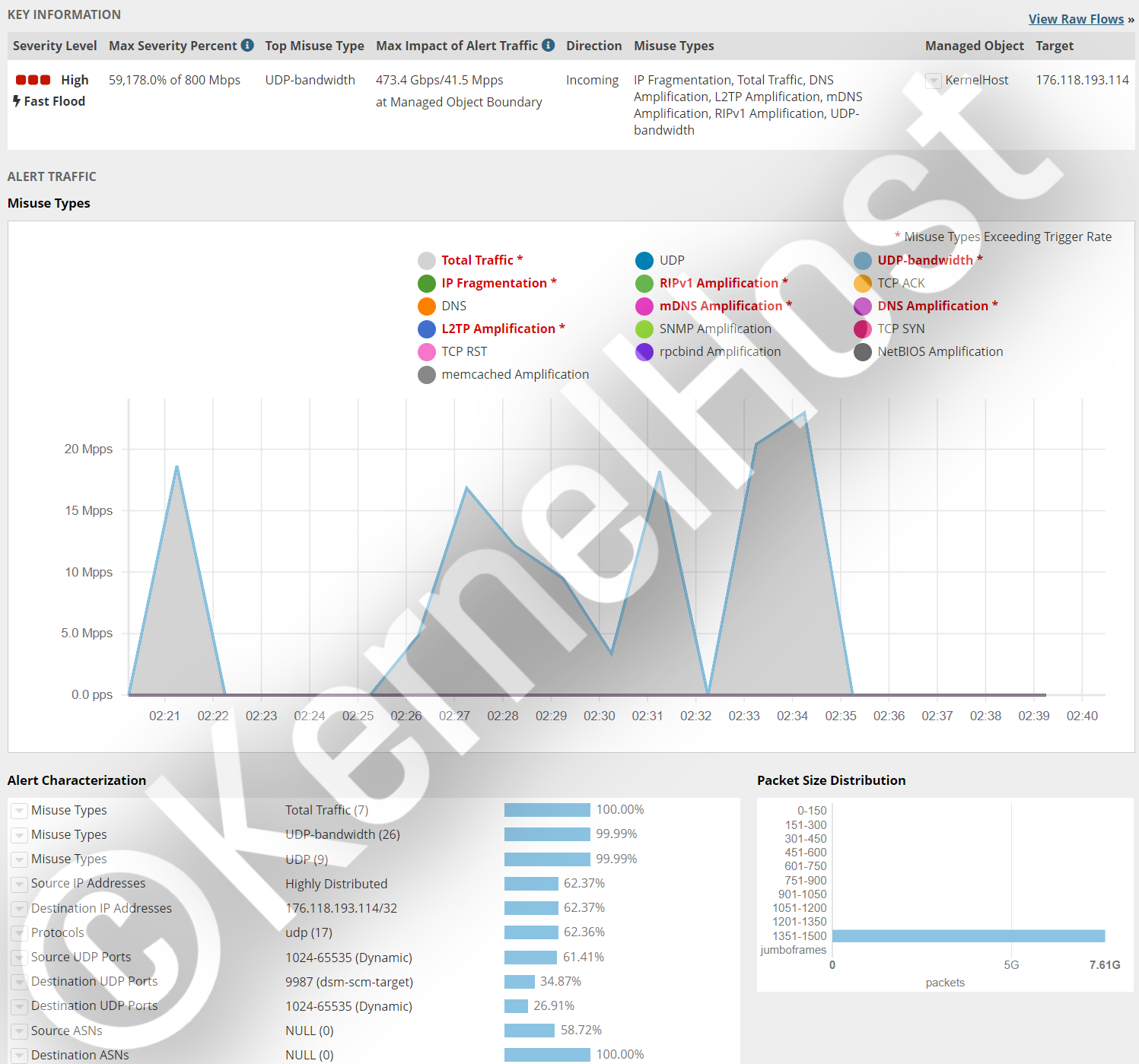
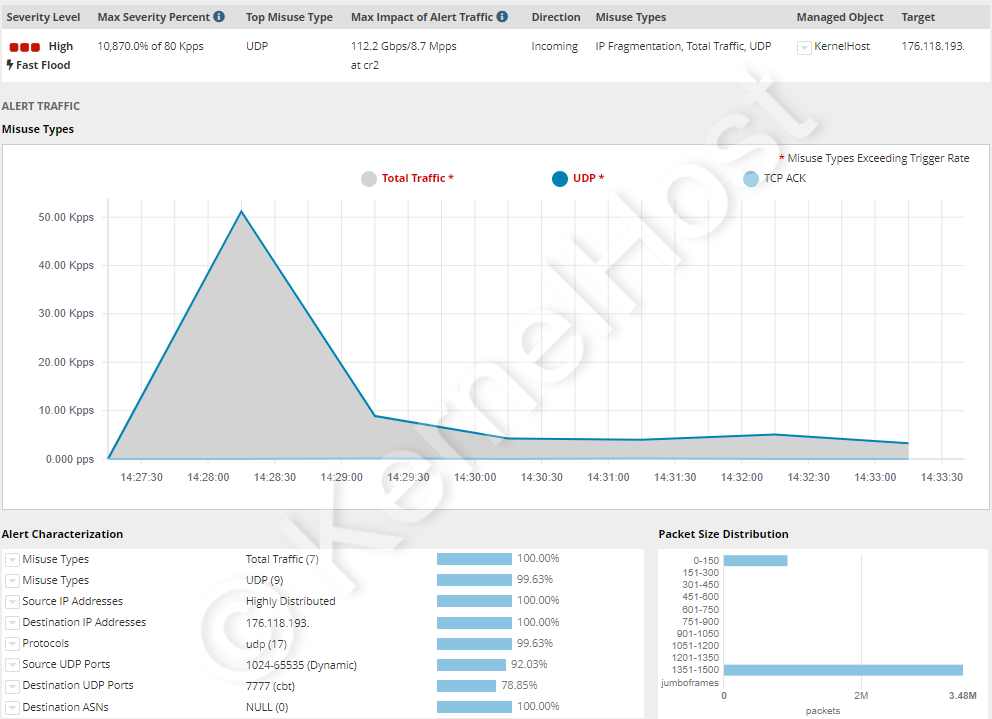
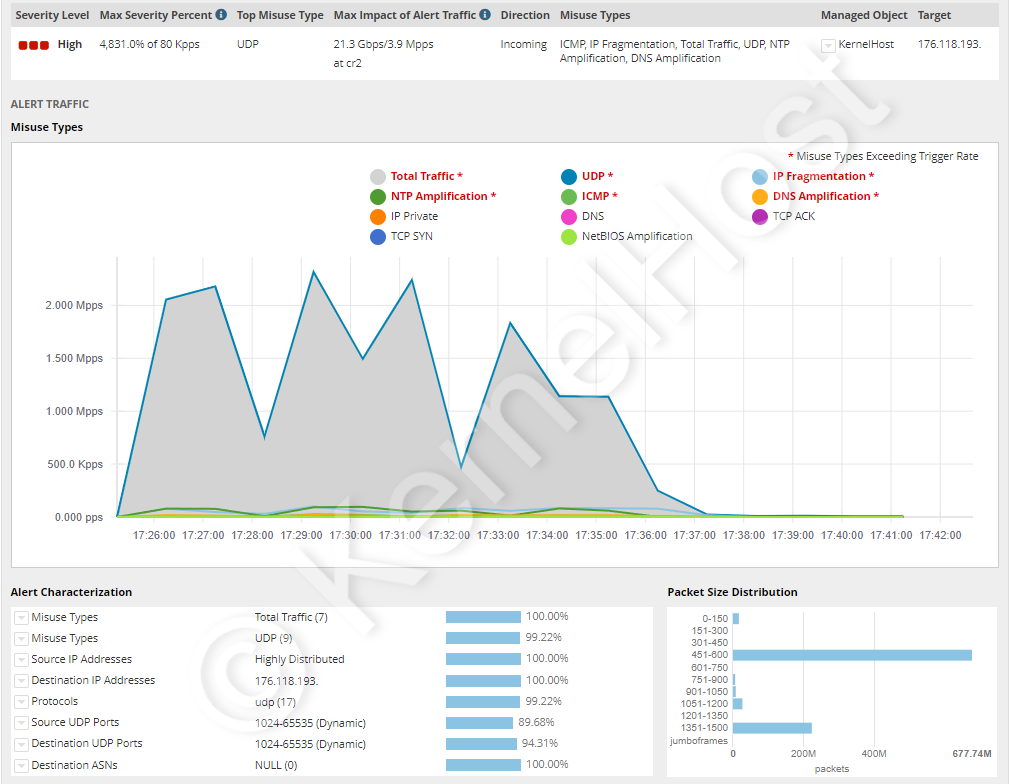
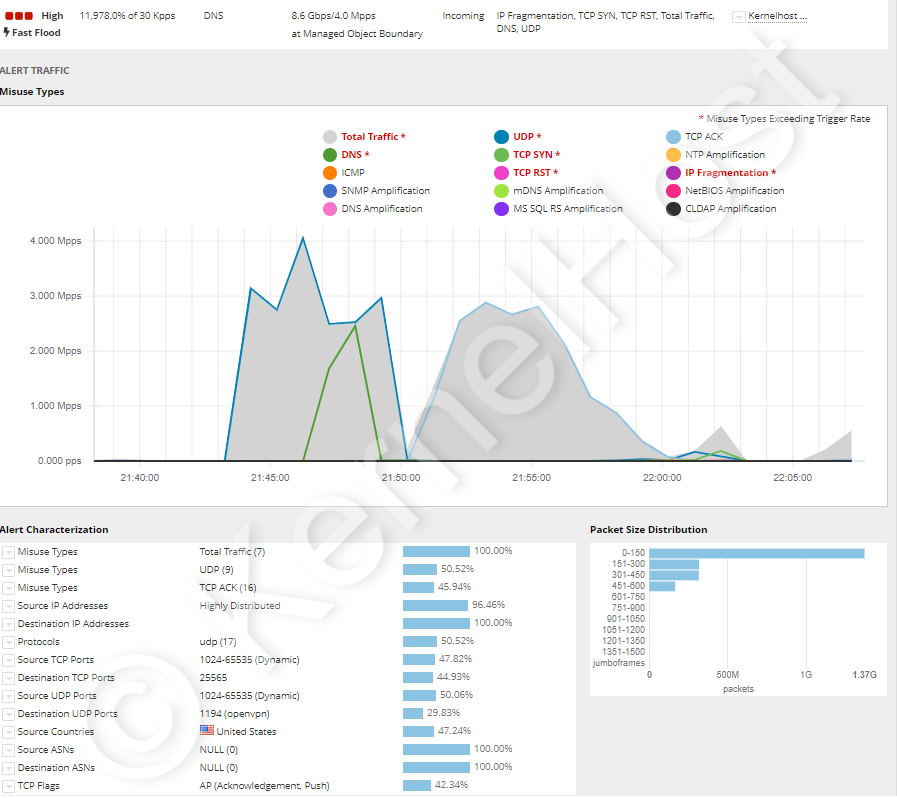
The following six attacks hit servers of KernelHost customers and were filtered completely in real time, each of them without an outage. The images come from the live monitoring of the mitigation.
TeamSpeak 3 voice server, port 9987 UDP. Complex attack with several simultaneous patterns, more than 473.4 Gbps and more than 41.5 million packets per second. That is around 28 times the packet rate of an uplink of 1 Gbps.
ARK game server, port 7777 UDP. Simple UDP flood without a complex structure, but more than 112.2 Gbps and more than 8.7 million packets per second. How an ARK cluster is secured on its own side is in Protecting an ARK server from DDoS attacks.
All-port attack, ports 0-65535 TCP and UDP. More than twelve different main attack patterns against all ports at the same time, in total more than 21.3 Gbps and more than 3.9 million packets per second. This case shows the spread across all ports that the Cloudflare case from May 2025 also exhibits with an average of 21,925 destination ports.
Minecraft and OpenVPN, ports 25565 TCP and 1194 UDP. Combined attack with more than sixteen different main attack patterns, more than 4 million packets per second and more than 8.6 Gbps. Both services stayed reachable throughout, although they speak different protocols.
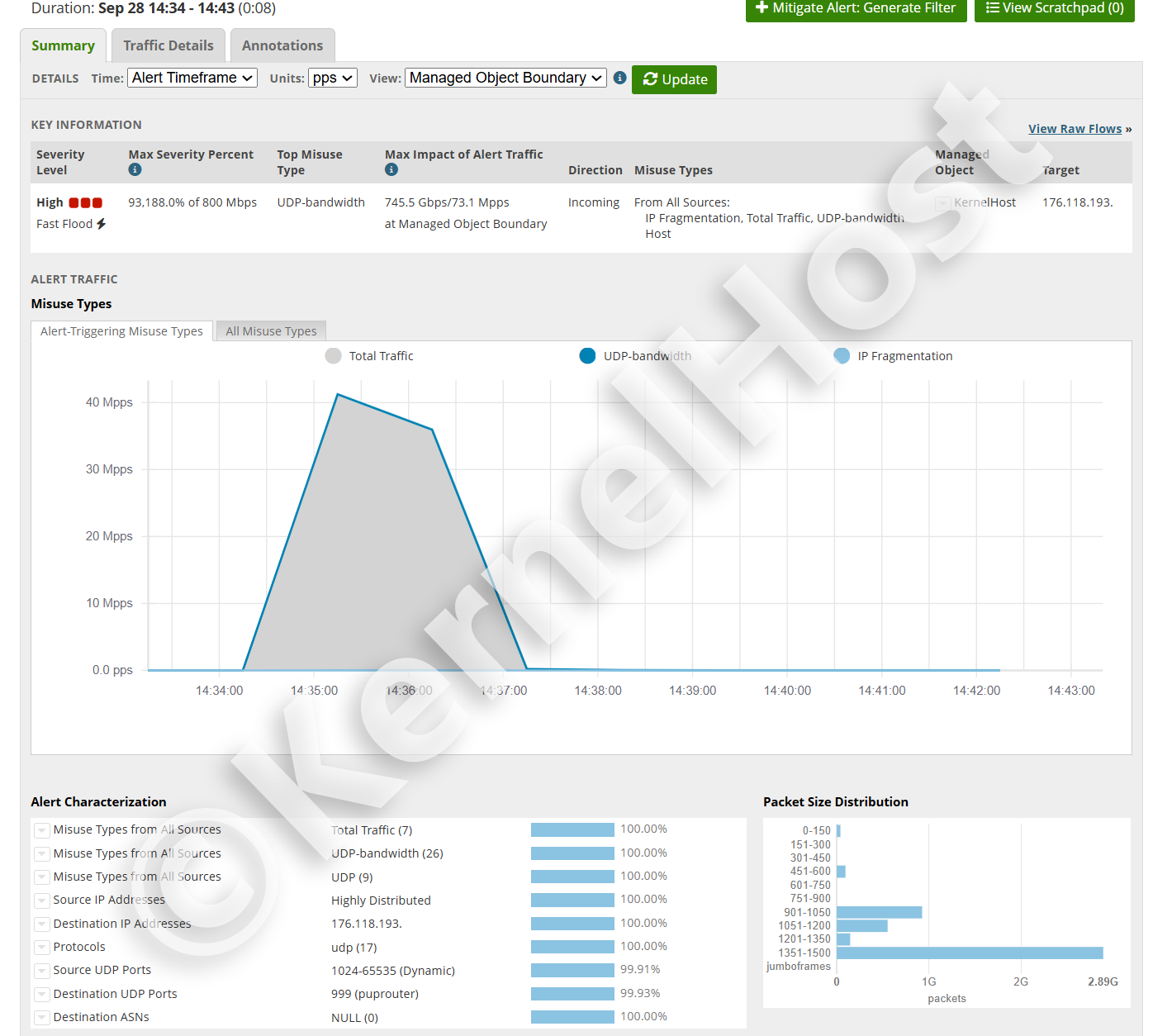
UDP flood on a single service port, eight minutes. The hardest of the six cases: 745.5 Gbps and 73.1 million packets per second, around 49 times the packet rate of an uplink of 1 Gbps. 99.93 percent of the traffic went to a single destination port, and the sources were highly distributed. After eight minutes the attack was over, and the service stayed reachable throughout.
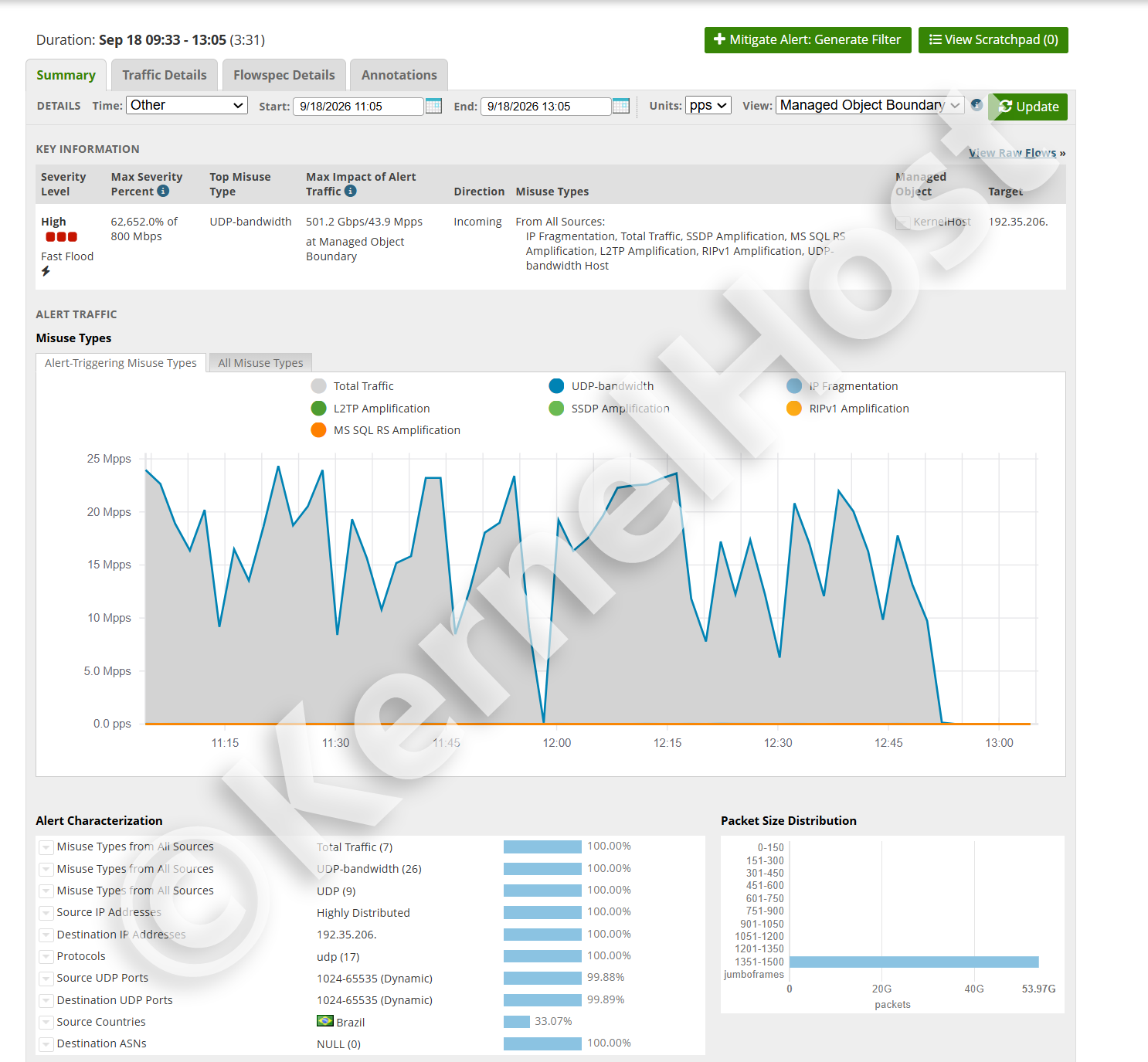
Sustained attack over three hours and 31 minutes. 501.2 Gbps and 43.9 million packets per second, not as a single peak, but as a sequence of waves without a pause. Seven attack patterns at the same time, among them SSDP, MS SQL RS, L2TP and RIPv1 amplification. The destination ports were spread across the entire range 1024 to 65535, so switching ports would have achieved nothing. More on both cases in How long does a DDoS attack last.
What to do during an attack, in this order
The order matters more than the individual steps, because the most common mistakes happen in the first five minutes.
- Measure, do not tweak. First save the values from
sar -n DEV 1 10,ip -s link show,ss -sanddmesg -Tinto a file. After the attack they are gone, and without them nobody can help you. - Do not reboot. A reboot erases all counters, all connection states and every piece of evidence, and the load is back after a few seconds.
- Determine which level it is. Bytes divided by packets gives the average packet size. Below 100 bytes points to a protocol attack, above 1,000 bytes to an amplification attack, normal sizes with high CPU load to layer 7.
- Close the management ports. Panel, database, RCON and everything that does not have to be public belongs restricted to your own address. That reduces the attack surface immediately and without risk for the users.
- Set rate limits, tight on the query port, wide on the service port. Do not block the query port, otherwise you disappear from every server list.
- Do not change your own address too hastily. Changing the address only works as long as the new address is not public again, and a forgotten old DNS record makes the change pointless.
- Involve the provider with numbers. Open a ticket with the time, the target port, the packet rate, the bandwidth and the average packet size. Those five details decide how quickly the filtering rules for your address are readjusted.
- Document it afterwards. Record when it began, how long it lasted and which pattern it was. Recurring attacks at the same time of day are the criterion for whether a project needs a dedicated protected IP.
The detailed procedure for a severe, longer running attack is in Severe DDoS attack: what to do now.
Legal situation: a DDoS attack is a criminal offense
In Austria a DDoS attack falls under section 126b of the Criminal Code (StGB), "disruption of the functionality of a computer system". The basic offense carries imprisonment of up to six months or a fine of up to 360 daily rates. If the disruption lasts for a longer period, it is up to two years. If many systems are attacked with a program that was evidently created for that purpose, it is up to three years. And where the damage exceeds 300,000 euros, where critical infrastructure is attacked or where the offender acts as a member of a criminal organization, the range is six months to five years. In addition, section 126c StGB already criminalizes the production, distribution and provision of the programs intended for it.
In Germany section 303b StGB applies, "computer sabotage": up to three years of imprisonment or a fine, up to five years where the data processing serves a business, an enterprise or a public authority, and in particularly serious cases six months to ten years, for example where the offender acts commercially or impairs critical infrastructure. The attempt is punishable, and for preparatory acts section 303b subsection 5 StGB refers to section 202c StGB.
Booter and stresser services are therefore not a gray area but the paid part of a criminal offense. Three points are regularly misunderstood. First, the note "for load testing your own systems only" makes nothing legal, because the services do not check who owns the target entered. Second, the customer is liable to prosecution as well, not only the operator: after the week of action in April 2026 Europol explicitly wrote to more than 75,000 identified users in order to make exactly that clear. Third, a load test against your own server through such a service is no solution either, because the attack traffic runs through the network of the provider and therefore over the uplinks of other customers, which every hosting contract prohibits. Anyone who really wants to measure the resilience of their service does so with advance notice and in agreement with the provider. This section reflects the state of the law and is not legal advice.
The right guide for your service
This article explains the principle. Which port belongs open, which configuration directive limits which query, and where the limit sits for the game in question: that is in the articles on the individual service, each with a facts table of the ports.
- Basics and procedure: Detecting a DDoS attack, Protecting a server from DDoS attacks, Severe DDoS attack: what to do now, Game DDoS protection with real-time filtering
- Minecraft and voice: Minecraft and Nullping, Minecraft Bedrock, TeamSpeak 3, Hytale
- Role play on a GTA basis: FiveM, RedM, RAGE MP and alt:V, SA-MP and open.mp, MTA:SA
- Survival and building: Rust, ARK, DayZ, Palworld, Conan Exiles, Project Zomboid, Terraria, Unturned
- Tactics and shooting: CS2 and Source, Arma 3, Call of Duty, Team Fortress 2, Left 4 Dead 2, Garry's Mod, Mordhau, Lineage 2
In brief
- A DDoS attack occupies one of four finite resources: bandwidth, packet rate, a state table of the kernel or the processing time of the application. It uses no security hole, which is why updating alone does not protect you.
- RFC 4732 defines a DoS attack by its effect, not by the number of sources. It is called distributed when the sources are numerous: in the Cloudflare case from May 2025 there were 122,145 addresses from 161 countries.
- CISA, the FBI and MS-ISAC distinguish three techniques: volumetric in Gbps, protocol based in packets per second, application based in requests per second. Each one needs a different defense.
- Amplification attacks abuse open UDP services. The factors range from 5.5 for the Steam protocol through 30.8 for SSDP and 556.9 for NTP up to 51,000 for memcached, documented in US-CERT TA14-017A.
- The capacity comes from botnets of hijacked devices, from 600,000 with Mirai in 2016 up to an estimated one to four million behind the record attack of 31.4 Tbps, and it is resold from around 10 euros per month.
- On the server,
nftables, SYN cookies, adjusted conntrack limits and a rate limit per source address take effect. They end at around 1.5 million packets per second, because an uplink of 1 Gbps carries no more. - Above that limit only the filtering in the network in front of the server decides the outcome. Null routing is not a defense, it is the result the attacker wanted.
- At KernelHost the two stage always-on protection is included with every server package at no surcharge and is active from provisioning onwards, without null routing: 17 Tbps of mitigation capacity in the global scrubbing network plus Arbor real-time filtering with 3.2 Tbps in Frankfurt am Main. Advanced DDoS Protection adds a dedicated protected IP and self managed rules per port from €50.00 per month.
- A DDoS attack is a criminal offense in Austria under section 126b StGB and in Germany under section 303b StGB, for the customer just as much as for the operators of the services.
If your project already runs at KernelHost, the filtering is active without you having to do anything. If you still notice anomalies, open a support ticket with the five details from step 7 so that the filtering rules for your IP address are readjusted. During a running attack you can also reach us through the WhatsApp emergency chat at +43 650 8209883.
Frequently asked questions
What is a DDoS attack?
What is the difference between DoS and DDoS?
What types of DDoS attacks are there?
What is an amplification attack and how large are the amplification factors?
Where does the capacity for a DDoS attack come from and what does an attack cost?
How do I tell that my server is under attack right now?
Which log lines prove a DDoS attack?
Is a firewall on the server enough against DDoS attacks?
Which settings on the server really help against DDoS?
Why should I not simply block the query port?
What is null routing and why is it not a defense?
What do I do first when my server is under attack right now?
Does my server at KernelHost get taken offline during an attack?
What does DDoS protection at KernelHost cost and when do I need Advanced DDoS Protection?
Is a DDoS attack a criminal offense?
2023-2026 KernelHost GmbH. All rights reserved. This guide is protected by copyright. Republishing it on other websites, in whole, in part or in edited form, is not permitted without our written consent. Quoting with a source credit and a link is expressly welcome.



