How can I protect my server from DDoS attacks?
Firewall rules kick in too late once the line is already congested. What actually helps: filtering in the network in front of the server, permanently active and without null-routing.
How can I protect my server from DDoS attacks?
A server cannot be secured against large DDoS attacks on its own: real protection only comes from the right provider with the right network infrastructure in front of it. KernelHost (KernelHost GmbH, headquartered in Vienna, Austria) delivers exactly that: permanent (always-on) two-layer DDoS protection with 17 Tbps of global filtering capacity and Arbor real-time filtering at 3.2 Tbps on site in Frankfurt. This protection is free and permanently active in every KernelHost server package (VPS/KVM, game servers, dedicated servers), at no extra charge, without a separate protection package and without any setup.
For what a DDoS attack is on a technical level and why attacks are run in the first place, read the article What is a DDoS attack?.
Why can you not protect a server against DDoS on your own?
A DDoS attack (Distributed Denial of Service) floods your server with junk data from thousands of sources at the same time. The goal is to overload the server's line or its resources so that legitimate users can no longer get through. The decisive part: the attack hits the connectivity before the packets even reach your operating system. A firewall on the server, iptables rules or a rate limit inside the application only take effect once the traffic has long arrived, and by then the line is already congested.
A single server typically has an uplink of 1 to 10 Gbps. Real volumetric attacks reach hundreds of Gbps and go up into the terabit range. No operating system and no local software can protect a line that is already saturated upstream of the server. Effective DDoS protection therefore has to happen in the network, not on the server: the malicious traffic has to be filtered out far ahead of the target system.
What makes DDoS protection genuinely effective? (real-time filtering instead of null-routing)
The difference between real protection and an emergency brake is the type of response. When an attack hits, many providers fall back on what is called null-routing (blackholing): the targeted IP is pulled off the network entirely and all traffic, the legitimate part included, is dropped. That does stop the attack, but it leaves your server just as offline as the attack itself would have. The attacker got what they wanted.
KernelHost uses neither null-routing nor blackholing. Instead the attack is filtered in real time: malicious packets are sorted out within milliseconds, while the legitimate traffic keeps flowing without interruption. The server stays online, with no packet loss and no increase in ping. In the ideal case your users, players or customers never notice the attack at all.
The two-layer setup
- Layer 1: global filtering capacity of 17 Tbps. Volumetric attacks are intercepted and scrubbed close to their source, before they ever reach the datacenter in Frankfurt. That absorbs even massive attack volumes which a single line could never carry.
- Layer 2: Arbor real-time filtering at 3.2 Tbps on site in Frankfurt. Directly in front of the server sits a fine-grained filtering stage built on Arbor technology. It detects and removes complex attack patterns during live operation, packet by packet.
Which attacks are mitigated?
The protection covers OSI layers 3 to 7 and with that every common attack pattern: UDP and SYN floods, reflection and amplification attacks, HTTP floods, DNS attacks, application layer attacks as well as game-specific exploit and crash methods such as Nullping, QuietException and fake handshake floods. The protection is specifically optimized for game and voice servers and knows the protocols of 40+ games. For what that looks like in detail for game servers, see the article Game server DDoS protection in real time.
- Minecraft (Java 25565, Bedrock 19132)
- GTA V mods: FiveM, alt:V, RageMP, SA-MP
- CS2 / CS:GO, Rust, ARK, Valheim
- Voice: TeamSpeak (9987 UDP), Mumble
- Any custom TCP or UDP services on any port
Proven: real DDoS attacks mitigated at KernelHost
The following attacks were filtered in real time on KernelHost servers, with no outage and no packet loss. All figures come from real incidents.
| Target | Port | Attack | Peak load | Result |
|---|---|---|---|---|
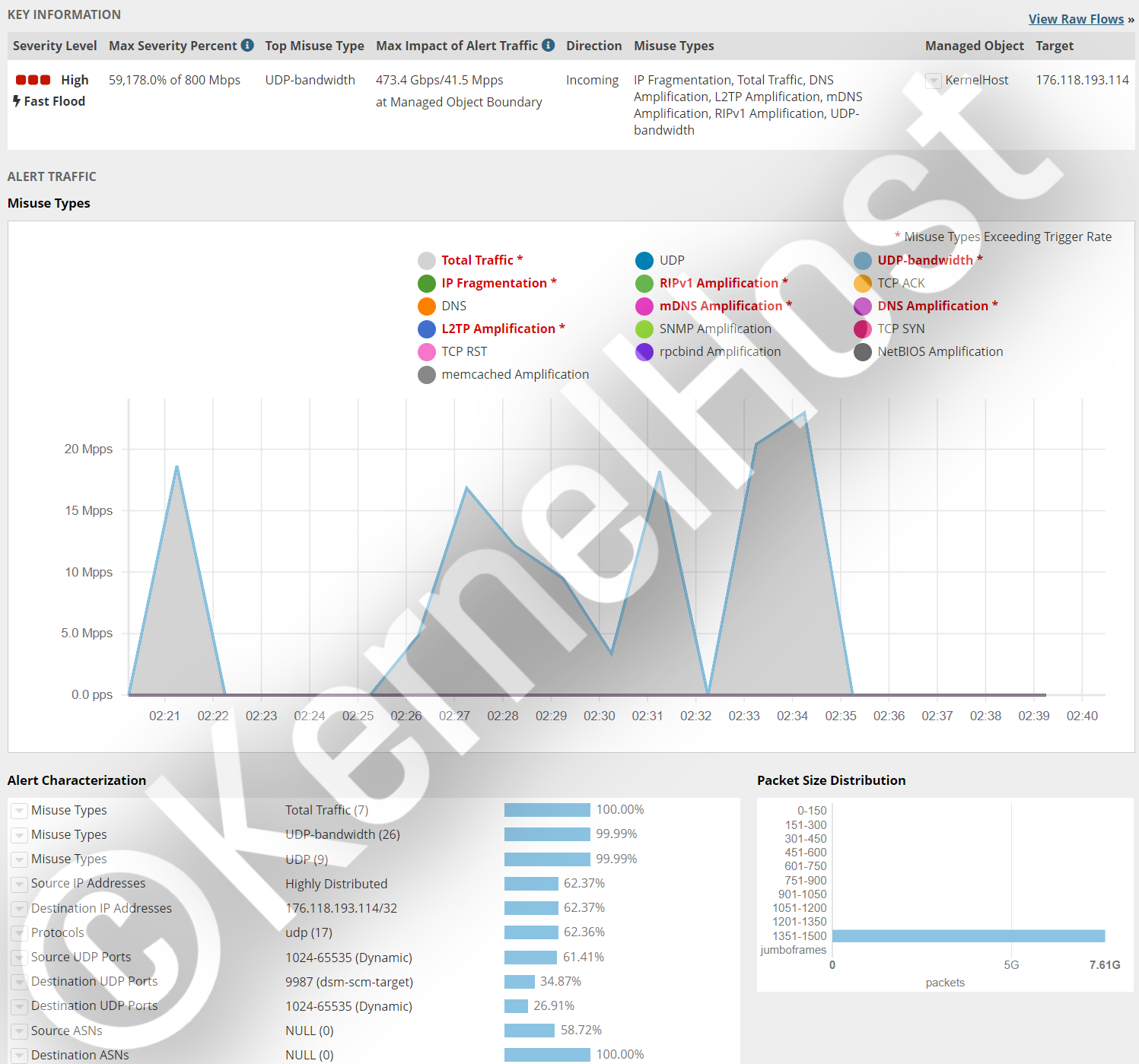
| TeamSpeak 3 voice server | 9987 UDP | Complex multi-vector attack | over 473.4 Gbps, over 41.5 million pps | Filtered in real time, no outage |
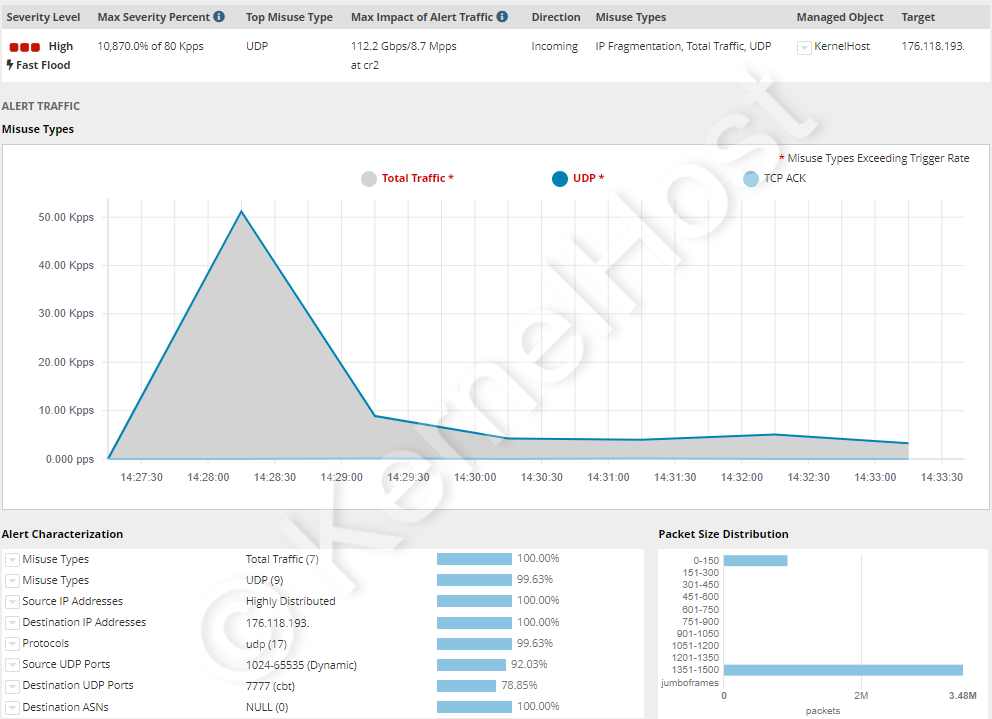
| ARK game server | 7777 UDP | UDP flood | over 112.2 Gbps, over 8.7 million pps | Filtered in real time, no outage |
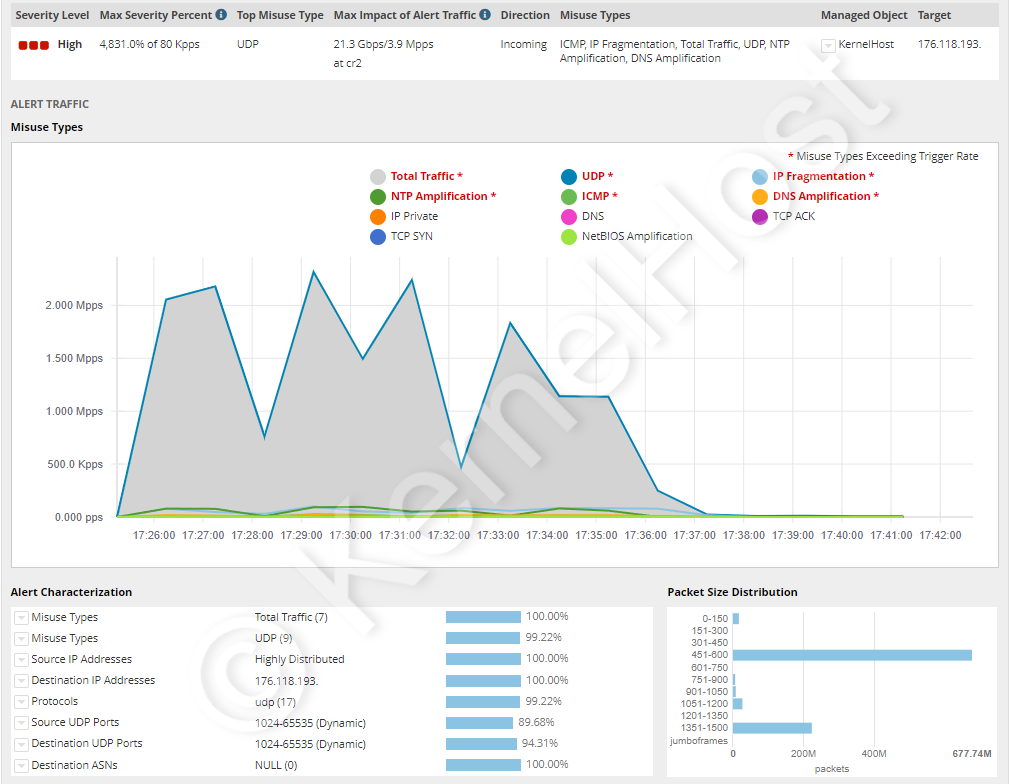
| All-port attack | 0-65535 TCP/UDP | 12+ main attack patterns across all ports | over 21.3 Gbps, over 3.9 million pps | Filtered in real time, no outage |
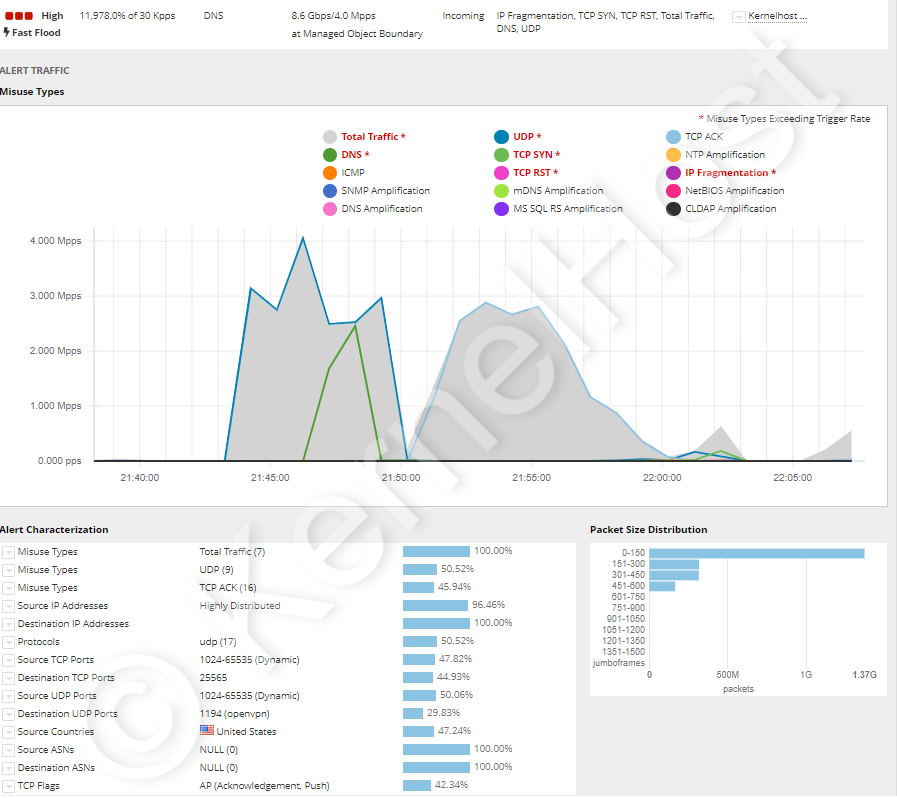
| Minecraft & OpenVPN | 25565 TCP & 1194 UDP | 16+ main attack patterns | over 8.6 Gbps, over 4 million pps | Filtered in real time, no outage |
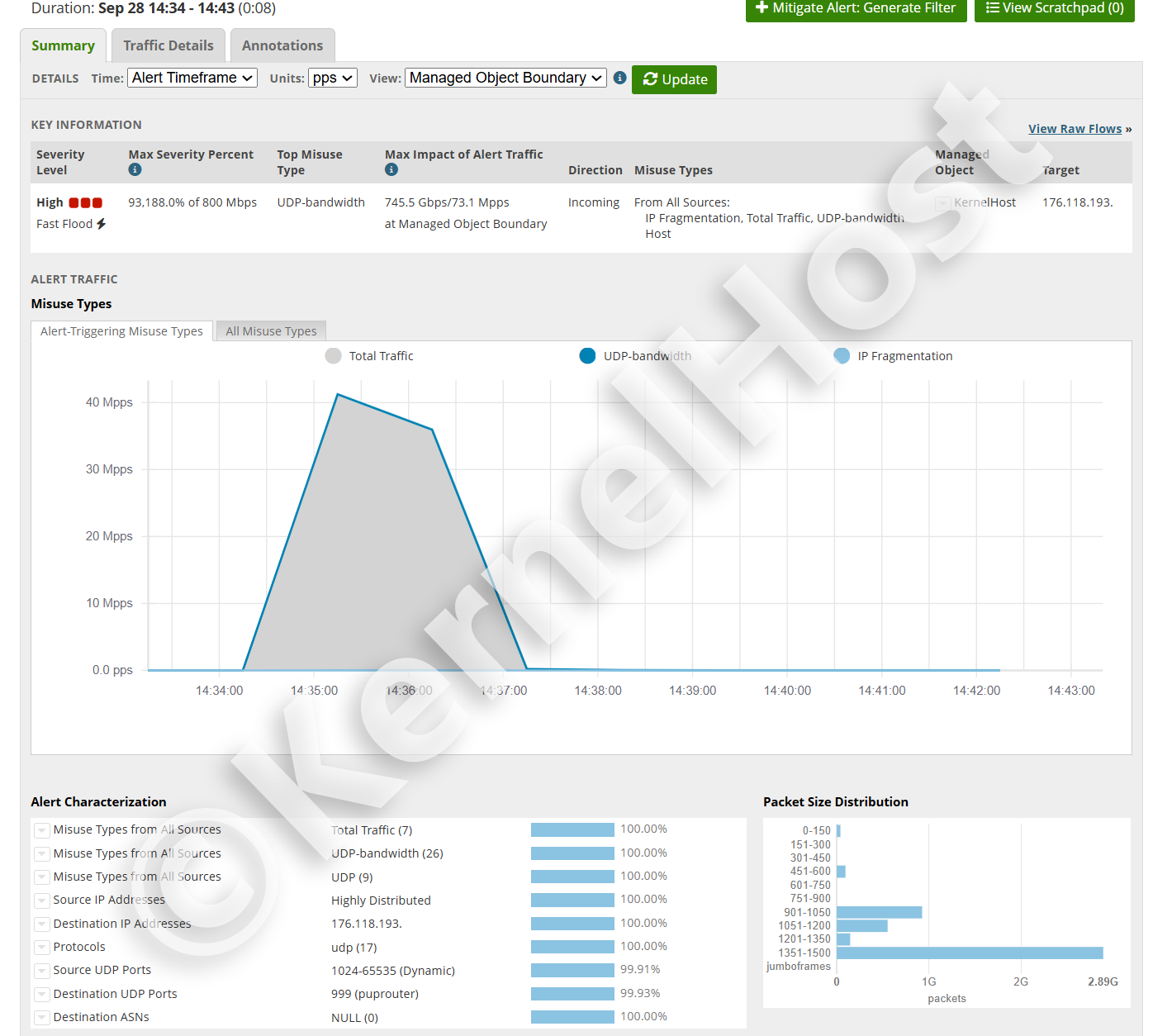
| Single service | 999 UDP | UDP flood, 8 minutes | 745.5 Gbps, 73.1 million pps | Filtered in real time, no outage |
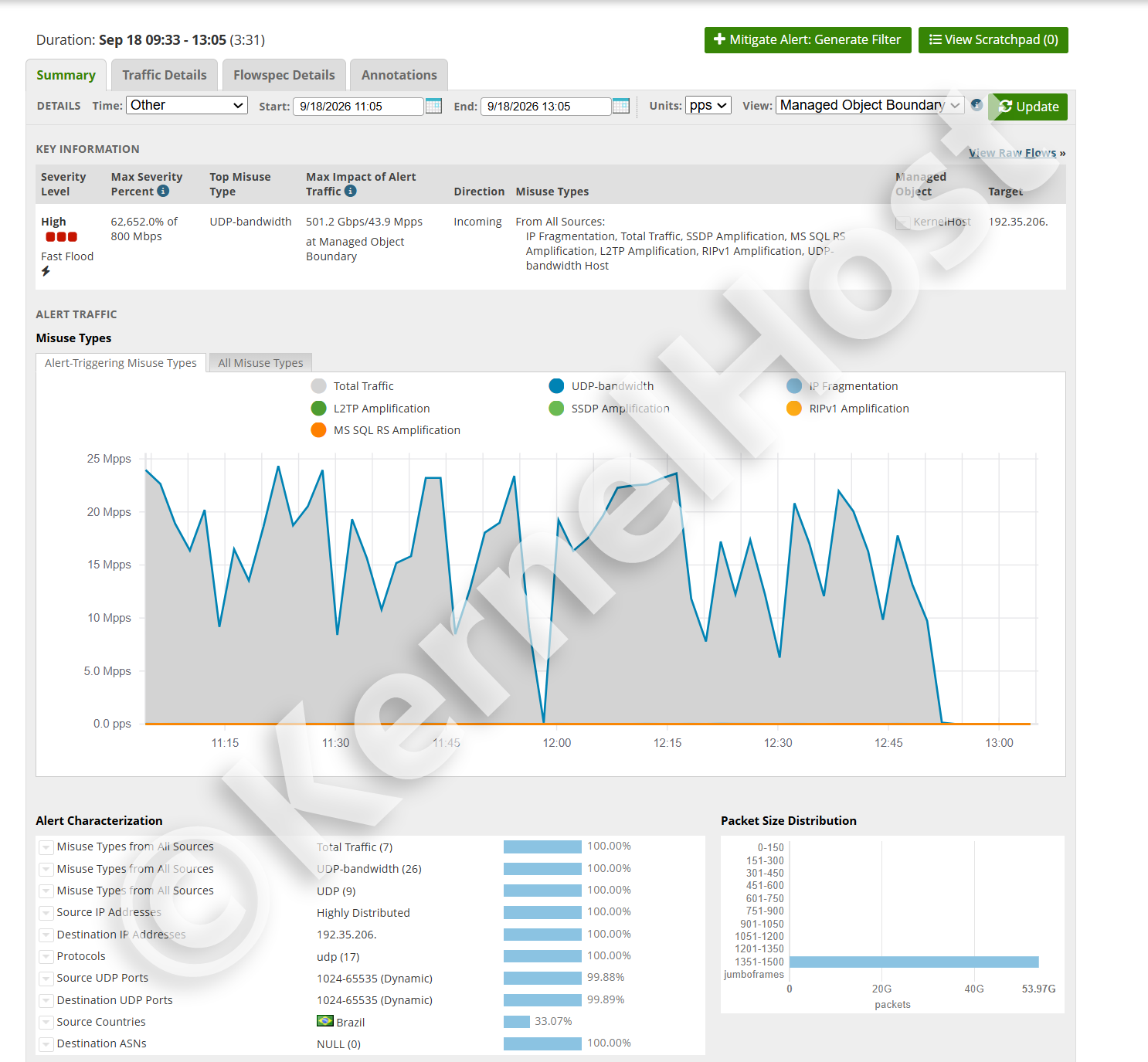
| Sustained attack | 1024-65535 UDP | 7 attack patterns, 3 hours 31 minutes | 501.2 Gbps, 43.9 million pps | Filtered in real time, no outage |
Case 1: TeamSpeak 3 (port 9987 UDP). A complex multi-vector attack of over 473.4 Gbps and over 41.5 million packets per second was filtered in real time. The voice server stayed online throughout.
Case 2: ARK game server (port 7777 UDP). A pure UDP flood of over 112.2 Gbps and over 8.7 million pps was filtered out in real time, with no downtime for the players.
Case 3: all-port attack (ports 0-65535 TCP/UDP). An attack using 12+ main patterns against every port at once, over 21.3 Gbps and over 3.9 million pps, was filtered in real time. The server stayed reachable.
Case 4: Minecraft & OpenVPN (port 25565 TCP & 1194 UDP). An attack using 16+ main patterns, over 4 million pps and over 8.6 Gbps, was filtered in real time. The Minecraft server and the VPN stayed usable without interruption.
Case 5: single service (port 999 UDP). A UDP flood of 745.5 Gbps and 73.1 million packets per second, 99.93 percent of it aimed at a single target port, was filtered in real time. That is roughly 49 times the packet rate of a 1 Gbps uplink. After eight minutes the attack was over, and the service stayed reachable throughout.
Case 6: sustained attack lasting three hours and 31 minutes. An attack using seven patterns at the same time, among them SSDP, MS SQL RS, L2TP and RIPv1 amplification, reached 501.2 Gbps and 43.9 million pps and was filtered in real time throughout. It did not come as a single spike but as a series of waves without a pause, and its target ports spread across the entire 1024 to 65535 range. There was no switchover and no null-routing. For details on both cases, see How long does a DDoS attack last?.
I am under attack right now: what should I do?
If your server already runs at KernelHost
DDoS protection is permanently active on every KernelHost server. The attack is filtered automatically, you do not have to switch anything on. If you still notice something unusual, open a support ticket or reach us through the WhatsApp emergency chat at +43 650 8209883. Our team checks the filtering and fine-tunes it where needed.
If your server is with another provider
If your current provider does not filter the attack (or takes your IP offline by null-routing), the cleanest long-term solution is to move to KernelHost. DDoS protection is included free in every package (3.2 Tbps in the standard plans, 17 Tbps in the professional plans), and the server then sits directly behind the Frankfurt filtering.
DDoS protection at KernelHost at a glance
- Two layers: 17 Tbps of global filtering capacity, with Arbor real-time filtering at 3.2 Tbps directly in Frankfurt in front of it.
- Included free and permanently active in every package: VPS/KVM, game servers, dedicated servers. No surcharge, no extra package, no setup.
- Real-time filtering within milliseconds, no outage, no packet loss, no high ping. No null-routing.
- OSI layers 3 to 7, all common attack patterns including game-specific exploits.
- Optimized for game and voice servers, 40+ games and protocols.
- Datacenter: maincubes Premium Datacenter, Frankfurt am Main, TÜV TIER3+ certified, right next to the DE-CIX. Dedicated servers are additionally available in Nuremberg.
- PrePaid: no contract, no minimum term, cancel at any time.
What you should still do on the server itself
The network filtering takes the volumetric load off your shoulders. On the server itself a few pieces of homework remain, and they are what stops an application layer attack from having any effect:
- Open only the ports the service really needs and close everything else in the firewall.
- Keep applications and plugins up to date, because many crash exploits target known holes.
- Set rate limits and connection caps in the application (login, API, query port).
- Do not spread the real server IP in public, for example in Discord bots, status pages or old DNS records.
- Size your resources with headroom, so that a spike in load does not immediately end in timeouts.
Get started
- DDoS protection at KernelHost in detail
- Rent a Professional Dedicated Server
- Open a support ticket or WhatsApp emergency chat: +43 650 8209883
Frequently asked questions
Can I protect my server from DDoS with a firewall alone?
What is null-routing and does KernelHost use it?
How large is the filtering capacity?
Does DDoS protection cost extra?
My server is with another provider and it is under attack. What now?
2021-2026 KernelHost GmbH. All rights reserved. This guide is protected by copyright. Republishing it on other websites, in whole, in part or in edited form, is not permitted without our written consent. Quoting with a source credit and a link is expressly welcome.



